Loading
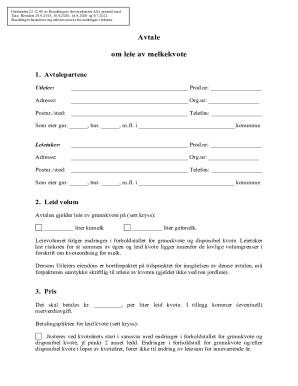
Get No Avtale Om Leie Av Melkekvote 2021-2026
How it works
-

Open form follow the instructions
-

Easily sign the form with your finger
-

Send filled & signed form or save
How to fill out the NO Avtale Om Leie Av Melkekvote online
The NO Avtale Om Leie Av Melkekvote is an essential document for leasing milk quotas. This guide will provide you with a clear, step-by-step process to accurately complete the form online, ensuring you understand each section and field easily.
Follow the steps to complete the form effectively.
- Click ‘Get Form’ button to obtain the form and open it in the editor.
- Begin filling in the details for ‘Avtalepartene’ (contracting parties). This section includes information about the lessor (Utleier) and the lessee (Leietaker). You will need to provide the respective names, organizational numbers (Org.nr), addresses, postal codes, and phone numbers. Additionally, note the property identifiers (gnr, bnr) in the corresponding fields.
- Specify the volume of milk that is being leased under ‘Leid volum’. Indicate whether the agreement pertains to cow milk or goat milk by marking the appropriate box.
- In the ‘Pris’ section, enter the price per liter for the leased quota in the designated field. You must also indicate if the payment will be adjusted annually or based on other defined criteria. Specify the payment account number and payment schedule.
- Complete the ‘Kvoteleiens varighet’ section by stating the start year of the lease period and the end year, which corresponds with the quota year. Note that renewal or cancellation conditions must be observed here.
- Complete the ‘Registrering hos Landbruksdirektoratet og godkjennelse fra panthaver’ section, ensuring the lessor registers the lease as required.
- Acknowledge public regulations in the ‘Offentlige reguleringer’ section by confirming understanding of the applicable regulations governing the lease.
- Read the ‘Mislighold’ and ‘Eierskifte m.v.’ sections carefully. Here, you will find the conditions under which the agreement may be terminated or how to manage changes in ownership.
- Address potential disputes by reviewing the ‘Tvist’ section. Consider if you want to include a dispute resolution clause.
- Finally, some additional notes or remarks can be entered in the ‘Annet’ section if necessary.
- Upon completion of the form, ensure all fields are accurately filled. Save any changes, then download, print, or share the completed form as needed.
Complete your documents online efficiently and accurately.