Loading
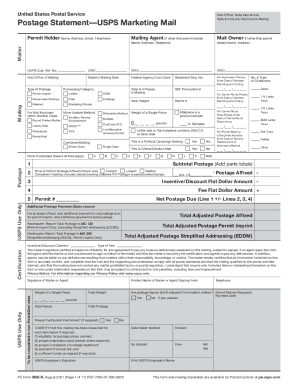
Get Usps Ps 3602-r 2021
How it works
-

Open form follow the instructions
-

Easily sign the form with your finger
-

Send filled & signed form or save
How to fill out the USPS PS 3602-R online
The USPS PS 3602-R form is essential for submitting USPS Marketing Mail. This guide provides a comprehensive overview of the form and offers step-by-step instructions to help users complete it efficiently online.
Follow the steps to fill out the USPS PS 3602-R form online
- Click ‘Get Form’ button to obtain the form and open it in the editor.
- Complete the Mailer and Mailing sections on page 1. This includes the Permit Holder, Mailing Agent (if applicable), and Mail Owner information.
- Refer to parts A through S to fill in the relevant details based on your mailing type. Each part corresponds to different categories (e.g., Letters, Flats, Parcels).
- Return to the Postage section on page 1 and tick the boxes that correspond to the parts you have completed. Calculate and enter the subtotal for postage.
- If you are using Postage Affixed mailing, complete Line 2 for it and check the appropriate pricing box.
- Fill out Lines 3 and 4 for any adjustments on the mailing, such as discounts or fees.
- Calculate the Net Postage Due on Line 5 by considering all adjustments and enter it as needed.
- Finalize the form by signing the Certification section. Ensure to attach all completed parts before submission.
- Save changes, download, print, or share the form as necessary.
Start completing your USPS PS 3602-R form online today!
Get form
Experience a faster way to fill out and sign forms on the web. Access the most extensive library of templates available.
Nonprofits pay postage, but they have had preferred postage rates for certain mailings since 1951, when Congress authorized the U.S. Post Service's Nonprofit Standard Mail.
Get This Form Now!
Use professional pre-built templates to fill in and sign documents online faster. Get access to thousands of forms.