Loading
Get Ca 13l-50 2021-2026
How it works
-

Open form follow the instructions
-

Easily sign the form with your finger
-

Send filled & signed form or save
How to fill out the CA 13L-50 online
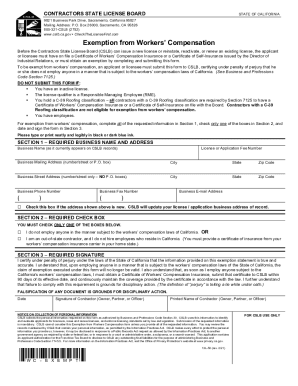
This guide provides a detailed overview of how to complete the CA 13L-50 form for exemption from workers' compensation in California. Following these instructions will help ensure that your application is filled out accurately and submitted successfully.
Follow the steps to complete the CA 13L-50 form online.
- Press the 'Get Form' button to obtain the form and open it in your preferred online editor.
- Fill out Section 1 with your required business name and address. Include the business name as it appears on CSLB records, your license or application fee number, your business mailing address, street address, city, state, zip code, business phone number, business fax number, and business e-mail address. If the address is new, check the appropriate box.
- Move to Section 2 and carefully check only one of the two provided boxes. You must indicate whether you do not employ anyone subject to the workers’ compensation laws or if you are an out-of-state contractor who does not hire California residents.
- In Section 3, sign and date the form. In this section, you will certify that the information provided is accurate under penalty of perjury. It is important to understand that if you subsequently employ anyone in a manner covered by California's workers' compensation laws, your exemption will no longer be valid.
- Once you have completed all sections of the form, save your changes. You may then download, print, or share the form as needed.
Complete your CA 13L-50 form online today to ensure timely processing of your exemption request.
This range can be three to seven years. That said, there is not usually a limit on permanent disability benefits. However, some states do stop weekly benefits when employees reach the age of 65. Also keep in mind that not all states will provide permanent partial disability benefits.