Loading
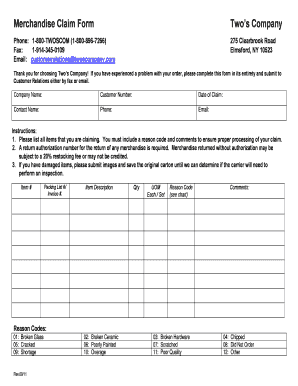
Get Merchandise Claim Form Rev0511 - Two039s Company
How it works
-

Open form follow the instructions
-

Easily sign the form with your finger
-

Send filled & signed form or save
How to fill out the Merchandise Claim Form Rev0511 - Two039s Company online
This guide provides clear, step-by-step instructions on completing the Merchandise Claim Form Rev0511 from Two’s Company. By following these steps, you can efficiently submit your claim online.
Follow the steps to successfully complete the Merchandise Claim Form online.
- Click ‘Get Form’ button to obtain the form and open it in the editor.
- Begin by entering your company name in the designated field.
- Next, input your customer number, which can usually be found on previous correspondence or invoices.
- Fill in the date of your claim to record when you are submitting this form.
- Provide your contact name, ensuring that the person filling out the form is clearly identified.
- Enter your phone number to facilitate communication regarding the claim.
- Include your email address for any correspondence related to your claim.
- In the section for claiming items, list all the products you are disputing. For each item, ensure you provide the item number, packing list number or invoice number, item description, quantity, and unit of measurement.
- Select the appropriate reason code for each item from the provided options, ensuring that your claims are categorized correctly.
- Add any comments that will help clarify your claim; this information is crucial for proper processing.
- If you are returning items, ensure you request a return authorization number, as unapproved returns may incur a fee.
- If you have received damaged items, attach images of the damages and retain the original carton for potential inspection by the carrier.
- After you have filled out all required fields, review your form for accuracy.
- Finally, save your changes, then choose to download, print, or share your completed form as needed.
Start the process now and complete your Merchandise Claim Form online to ensure a swift resolution.
Individual healthcare providers use the CMS 1500 form to submit claims to insurance companies for reimbursement. The form allows providers to provide detailed information about the services provided and the charges associated with those services, which can help ensure accurate and timely payment.