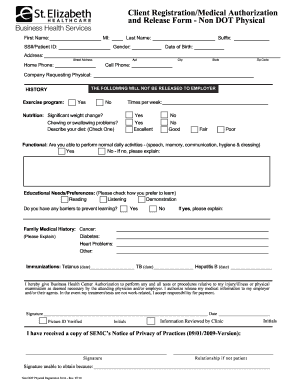
Get Client Registration/medical Authorization And Release Form - Non Dot Physical
How it works
-

Open form follow the instructions
-

Easily sign the form with your finger
-

Send filled & signed form or save
How to fill out the Client Registration/Medical Authorization And Release Form - Non DOT Physical online
Filling out the Client Registration/Medical Authorization And Release Form - Non DOT Physical online is a straightforward process. This guide will lead you through each section of the form, ensuring that you provide all necessary information clearly and accurately.
Follow the steps to successfully complete the form.
- Click ‘Get Form’ button to obtain the form and open it in the editor.
- In the first section, fill in your first name, middle initial, last name, and suffix if applicable. Enter your Social Security number or patient ID, gender, and date of birth for identification purposes.
- Provide your full residential address, including street address, apartment number (if applicable), city, state, and zip code. Additionally, include your home and cell phone numbers for contact purposes.
- Indicate the company requesting the physical examination. This is important for administrative purposes.
- In the history section, answer the question regarding your exercise program and indicate how many times per week you engage in such activities. Provide information on any significant weight changes and dietary concerns, checking the appropriate boxes.
- Answer questions related to your functional abilities concerning daily activities such as speech, memory, communication, hygiene, and dressing. If you experience any limitations, explain them in detail.
- Indicate your educational needs and preferences by selecting from the options provided. Also, if there are any barriers to your learning, be sure to disclose them.
- Provide your family medical history, particularly regarding cancer, diabetes, heart problems, and any other relevant conditions. This information helps healthcare professionals understand your background.
- List your immunizations, including the dates for Tetanus, TB, and Hepatitis B. This section is essential for your medical records.
- Review the authorization statement and ensure you understand the implications of giving Business Health Center authorization for tests and procedures. Sign and date the form where indicated.
- If you are not the patient, please indicate your relationship to the patient and sign where required. Include a note if you were unable to obtain a signature.
- Once you have filled out the form completely, review all the information for accuracy. You may then save changes, download, print, or share the form as needed.
Complete your Client Registration/Medical Authorization And Release Form - Non DOT Physical online today!
Filling out a Client Registration/Medical Authorization And Release Form - Non DOT Physical is straightforward. Start by entering your personal details, including your name, address, and contact information. Next, specify the medical services you are authorizing; this may include tests, evaluations, or treatment methods. Always make sure to review the completed form for accuracy before submission, as this ensures a smooth process for your medical provider.
Industry-leading security and compliance
-
In businnes since 199725+ years providing professional legal documents.
-
Accredited businessGuarantees that a business meets BBB accreditation standards in the US and Canada.
-
Secured by BraintreeValidated Level 1 PCI DSS compliant payment gateway that accepts most major credit and debit card brands from across the globe.