Loading
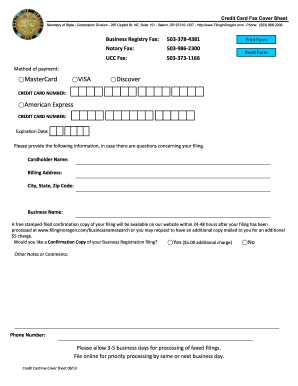
Get Or Sos Credit Card Fax Cover Sheet 2013
How it works
-

Open form follow the instructions
-

Easily sign the form with your finger
-

Send filled & signed form or save
How to use or fill out the OR SOS Credit Card Fax Cover Sheet online
Filling out the OR SOS Credit Card Fax Cover Sheet online is a straightforward process that ensures your payment is processed efficiently. This guide provides clear instructions to help you navigate each section of the form with ease.
Follow the steps to successfully complete the form online.
- Click ‘Get Form’ button to obtain the form and open it in the editor.
- Select your preferred method of payment by checking the appropriate box for MasterCard, VISA, Discover, or American Express.
- Enter the Credit Card Number in the designated field. Ensure that the information is accurate to avoid processing errors.
- Fill in the Expiration Date of the credit card in the provided section.
- Provide your Cardholder Name in the appropriate field, making sure to include any middle names or initials as necessary.
- Input the Billing Address, including street address, City, State, and Zip Code.
- Indicate the Business Name for the filing in the specified area, ensuring that it matches your official business registration.
- Decide whether you would like a Confirmation Copy of your Business Registration filing by selecting 'Yes' or 'No.' If 'Yes' is selected, note that an additional fee of $5 will apply.
- Provide any Other Notes or Comments in the designated section, which may help clarify your request.
- Enter your Phone Number so that the office can contact you if needed regarding your filing.
- Review all entered information to ensure accuracy before proceeding.
- Once you are satisfied with the form, you can save changes, download, print, or share the completed form as needed.
Begin filling out the OR SOS Credit Card Fax Cover Sheet online today for a smooth filing experience.
Get form
Experience a faster way to fill out and sign forms on the web. Access the most extensive library of templates available.
To print a fax cover sheet, first ensure that you have a digital version ready, preferably created using a template like the OR SOS Credit Card Fax Cover Sheet. Open the document in your preferred editing software, adjust any necessary details, and select 'Print' from the file menu. This simple process helps you easily create a professional-looking cover sheet.
Get This Form Now!
Use professional pre-built templates to fill in and sign documents online faster. Get access to thousands of forms.