Loading
Get Atf E-form 5320.2 2017-2026
How it works
-

Open form follow the instructions
-

Easily sign the form with your finger
-

Send filled & signed form or save
How to fill out the ATF E-Form 5320.2 online
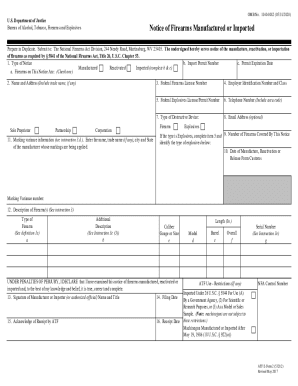
Filling out the ATF E-Form 5320.2 is an essential process for notifying the Bureau of Alcohol, Tobacco, Firearms and Explosives about the manufacture or importation of firearms. This guide provides clear, step-by-step instructions to help you complete the form accurately and efficiently.
Follow the steps to successfully complete the ATF E-Form 5320.2 online.
- Press the ‘Get Form’ button to access the ATF E-Form 5320.2 and open it in the editor.
- In the first section, select the type of notice you are filing: reactivated, imported, or manufactured. Fill in relevant details such as the Import Permit Number and Permit Expiration Date if applicable.
- Enter your name and address, including your trade name, if any, in the designated fields. Indicate your business structure, such as sole proprietor, partnership, or corporation.
- Provide your Federal Firearms License Number, Employer Identification Number, and Federal Explosives License or Permit Number. Ensure all numbers are entered accurately.
- Include your contact details: telephone number and optional email address. This information is crucial for any follow-up communications.
- If the type of notice involves explosives, identify the specific types and the number of firearms covered by this notice. Include details about the Date of Manufacture, Reactivation or Release From Customs.
- In the description section, detail the types of firearms by providing additional descriptions, caliber, gauge or size, and model. Ensure the descriptions are clear to avoid confusion.
- Sign the form, indicating your position as the manufacturer or importer, and fill in the filing date. Ensure this is done in ink for authenticity.
- Review the completed form to verify all information is correct and legible. Make necessary adjustments for any errors encountered during the filling process.
- Once all fields are complete, save your changes. You may download, print, or share the completed form as needed.
Complete your ATF E-Form 5320.2 online today to ensure compliance with firearms regulations.