Loading
Form preview
  • US Legal Forms
  • Other Templates
  • Miscellaneous Forms
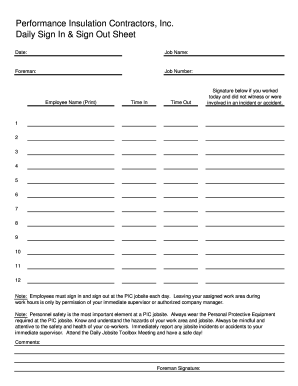
  • Performance Insulation Contractors Daily Sign In & Sign Out Sheet

Get Performance Insulation Contractors Daily Sign In & Sign Out Sheet

Ot witness or were involved in an incident or accident. 1 2 3 4 5 6 7 8 9 10 11 12 Note: Employees must sign in and sign out at the PIC jobsite each day. Leaving your assigned work area during work hours is only by permission of your immediate supervisor or authorized company manager. Note: Personnel safety is the most important element at a PIC jobsite. Always wear the Personal Protective Equipment required at the PIC jobsite. Know and understand the hazards of your work area and jobsite. Alwa.

How it works

  1. Open form

    Open form follow the instructions

  2. Easily sign form

    Easily sign the form with your finger

  3. Share form

    Send filled & signed form or save

How to fill out the Performance Insulation Contractors Daily Sign In & Sign Out Sheet online

Filling out the Performance Insulation Contractors Daily Sign In & Sign Out Sheet online is a straightforward process. This guide will provide you with clear instructions on how to navigate each section of the form effectively.

Follow the steps to complete the form accurately and efficiently.

  1. Click ‘Get Form’ button to obtain the form and open it in the editor.
  2. Input the date in the specified field at the top of the form. Ensure the date is accurate to reflect the day of work.
  3. Enter the job name in the provided section. This should be the specific name of the project you are working on.
  4. Fill in the foreman's name. This person is responsible for overseeing the work done at the job site.
  5. Input the job number relevant to the project. This is often provided by your employer or project manager.
  6. In the Employee Name field, clearly print your full name. This identifies you as the individual signing in and out.
  7. Record your time in the appropriate 'Time In' field. Note the exact time you begin your work for the day.
  8. Document your time out in the 'Time Out' field. This should indicate the exact time you finish your work.
  9. If you worked today and there were no incidents or accidents, sign in the designated area to confirm your presence.
  10. Review any notes regarding safety and jobsite protocols. Remember that safety is a priority at the jobsite.
  11. If applicable, provide any comments related to your workday in the comments section for additional notes.
  12. Finally, ensure that the foreman signs the form to confirm all entries. This should be done before submitting the document.
  13. Save your changes, and choose to download, print, or share the completed form as required.

Complete your Performance Insulation Contractors Daily Sign In & Sign Out Sheet online today for a seamless documentation process.

Get form

Experience a faster way to fill out and sign forms on the web. Access the most extensive library of templates available.
Get form

Related content

PRE-CONSTRUCTION MEETING SIGN-IN SHEET
This section must demonstrate that the individual: • will be onsite on a daily basis...
Learn more
Summary of Work Page 01 10 00 - 1 of 10
The Contractor shall set these signs out the night before spraying begins. 4. The...
Learn more
KW2M-A / KW2M-X User's Manual
Feb 6, 2020 — Log files are uploaded once a day at the designated time. You can test to...
Learn more

Related links form

IL Financial Affidavit Package 2016 Windoor WD06 Replacement Windows Form PA Stonebriar Psychiatric Services Medical and Social History KY 71A101 2016

Get This Form Now!

Use professional pre-built templates to fill in and sign documents online faster. Get access to thousands of forms.
Get form
If you believe that this page should be taken down, please follow our DMCA take down processhere.
Get Performance Insulation Contractors Daily Sign In & Sign Out Sheet
Get form

Form categories

Real Estate
  • Home Sale
  • Deeds
  • Leases
  • Landlord Tenant
  • First Refusal Agreement
  • Lis Pendens
  • View all Real Estate
Business & Commercial
  • Small Business
  • Contracts
  • Construction
  • Employment
  • Limited Liability Company
  • Partnerships
  • View all Business & Commercial
Estate Planning
  • Personal Planning
  • Last Will and Testament
  • Living Trust
  • Power of Attorney
  • Living Will (Healthcare Directive)
  • Probate
  • Trusts
  • Small Estate
  • View all Estate Planning

Other Legal Areas

  • Civil Actions
  • Civil Procedure
  • Animals
  • Affidavits
  • Bill of Sale
  • Oil Gas and Minerals
  • Name Change
  • Other
Family Law
  • Divorce
  • Annulment
  • Adoption
  • Marriage
  • Child Justice
  • View all Family Law
  • Forms Catalog
  • Other Templates

Company

  • About Us
  • Pricing
  • Legal Hub
  • Affiliate Program

Knowledge Base

  • Help Portal
  • Legal Resources
  • Blog
  • Industries
  • Legal Guides
  • Sitemap

Services

  • Notarize
  • Form Selector

Support

  • Contact Us
  • Delete My Account

Products

  • USLegal
  • FormsPass
  • pdfFiller
  • signNow
  • altaFlow
  • DocHub
  • Instapage
Social Media
Call us now toll free:
+1 833 426 79 33
As seen in:
© 2026 US Legal Forms. All rights reserved.
  • Your Privacy Choices
  • Terms of Service
  • Privacy Notice
  • Content Takedown Policy
  • Bug Bounty Program