Loading
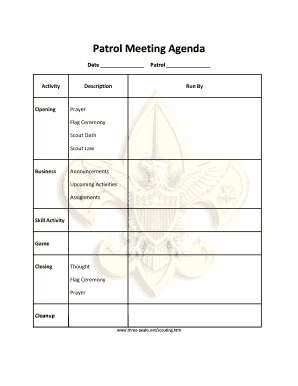
Get Patrol Meeting Agenda - Three-peaksnet
How it works
-

Open form follow the instructions
-

Easily sign the form with your finger
-

Send filled & signed form or save
How to fill out the Patrol Meeting Agenda - Three-peaksnet online
Filling out the Patrol Meeting Agenda - Three-peaksnet online is a straightforward process that helps you organize and plan your meetings effectively. This guide will walk you through each section of the form to ensure you capture all necessary information clearly.
Follow the steps to complete the Patrol Meeting Agenda with ease.
- Press the ‘Get Form’ button to access the Patrol Meeting Agenda and open it in your preferred online editing tool.
- In the 'Date' field, enter the date of the meeting for your records.
- For the 'Patrol' section, specify the name or designation of your patrol.
- Under 'Opening,' fill in the details for the activities that will begin the meeting. This includes noting the person who will run the prayer, flag ceremony, Scout oath, and Scout law.
- In the 'Business' section, list announcements, upcoming activities, and any assignments that need to be made.
- For the 'Skill Activity' section, describe the scouting skill that will be practiced or learned during the meeting.
- In the 'Game' section, note the Scouting game that will be played, ensuring it is suitable for the activities planned.
- In the 'Closing' section, provide a brief thought, prayer, or closing ceremony details to end the meeting.
- After completing all sections, review the agenda for accuracy and completeness.
- Finally, save your changes, then download, print, or share the completed form as needed.
Start filling out the Patrol Meeting Agenda online today!