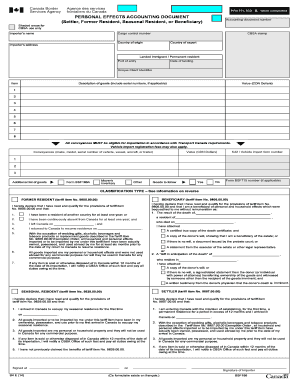
that the donor's death is imminent. SETTLER (tariff item No. 9807.00.00) SEASONAL RESIDENT (tariff item No. 9829.00.00) I hereby declare that I have read and qualify for the provisions of tariff item No. 9829.00.00 and that: I hereby declare that I have read and qualify for the provisions of tariff item No. 9807.00.00 and that: 1. I arrived in Canada to occupy my seasonal residence for the first time 1. I am entering Canada with the intention of establishing, for the first time, a permanent.
Open form follow the instructions
Easily sign the form with your finger
Send filled & signed form or save
How to fill out the Canada B4 E online
The Canada B4 E form is essential for customs declarations regarding personal effects for settlers, former residents, seasonal residents, or beneficiaries returning to Canada. This guide will help you navigate the online form and ensure accurate completion.
Follow the steps to accurately complete the Canada B4 E form online.
- Click ‘Get Form’ button to obtain the form and open it in the editor.
- Begin by filling out the importer's name and address in the designated fields. Ensure that all information is accurate and complete.
- Complete the section for conveyances by providing necessary details about vehicles or vessels, including make, model, and serial numbers.
- Read carefully through the declaration sections for former residents, settlers, or seasonal residents to ensure you qualify for the applicable tariff items and check the boxes as necessary.
- Finally, sign and date the form at the specified area before saving changes, downloading, printing, or sharing the form as needed.
Complete your Canada B4 E document online to ensure a smooth customs process.
Experience a faster way to fill out and sign forms on the web. Access the most extensive library of templates available.
Related content
Jul 19, 2017 — Those who fled Eritrea prior to independence and got asylum before 1991...
Area B4. Critical Thinking/. Analytical Thinking. Meets Math. Competency ... Area E. Life...
Não coloque o cabo de força próximo a fontes de calor, como aquecedores ou radiadores...
Get answers to your most pressing questions about US Legal Forms API.
How to fill a declaration form at Canada airport?
To fill out a declaration form at a Canadian airport, you will need to provide information about the goods you are bringing into the country. This includes their value and any related receipts. Make sure to review the form carefully before submission to avoid any misunderstandings. You can prepare in advance by using templates from uslegalforms.
What is a B4E form?
A B4E form is a specific customs declaration used for certain goods being imported into Canada. This form helps customs officials assess the contents of your shipment. Understanding the B4E form can help ensure compliance with Canadian customs regulations. For detailed guidance, refer to resources available on uslegalforms.
How to fill a B4 form for Canada?
To fill out a B4 form for Canada, clearly list each item you are declaring. Include descriptions, values, and quantity of goods. This form is especially useful for travelers bringing personal belongings or gifts. For straightforward guidance, consider visiting uslegalforms to access sample forms and instructions.
How to fill out a w8ben form in Canada?
Filling out a W-8BEN form in Canada is necessary for non-U.S. individuals who receive certain types of income from the United States. You will need to provide your name, country of citizenship, and tax identification number. Ensure you complete all sections accurately to benefit from tax treaties between the U.S. and Canada.
How do I get an eTA to Canada?
To obtain an eTA to Canada, simply apply online through the official government website. You will need to provide personal details, passport information, and answer a few questions. The process is straightforward and usually takes minutes. It’s essential to make sure your documentation is complete to ensure quick approval.
Do I have to fill out a customs declaration form in Canada?
Yes, if you are bringing goods into Canada, you must complete a customs declaration form. It is important to accurately declare all items to avoid any delays or penalties. The Canada B4 E form is a common choice for travelers carrying multiple items. Utilizing platforms like uslegalforms can help streamline this process.
How to fill out a B4 form in Canada?
Filling out a Canada B4 E form requires accurate details about your goods. Start by listing the items you are bringing into Canada, along with their value and description. Ensure you declare any goods that need to be reported. You can find helpful resources and templates on uslegalforms to assist with the process.
Do I need to fill out an eTA for Canada?
If you are traveling to Canada by air and are from a visa-exempt country, you will need to complete an Electronic Travel Authorization (eTA). This process requires filling out an online form, including personal information and travel plans. Ensure that you complete this step before your flight, as lack of an eTA can lead to boarding denial. For easy access to the eTA application, consider platforms like USLegalForms.
What is the B4E form?
The B4E form, or Canada B4 E, is a declaration form used by travelers returning to Canada to report their goods. This form helps customs assess the value of items and determine if any duties are applicable. Understanding what to report is important for a smooth customs experience. For tailored assistance, visit USLegalForms for step-by-step guidance in completing the B4E form.
How to fill out a declaration form for Canada?
Filling out a declaration form for Canada involves entering detailed information about the goods you are bringing into the country. The Canada B4 E form should list all applicable items and their values. It is crucial to be thorough, as this declaration affects your duties and taxes. If you need guidance, USLegalForms provides templates and resources that simplify the declaration process.
Use professional pre-built templates to fill in and sign documents online faster. Get access to thousands of forms.
If you believe that this page should be taken down, please follow our DMCA take down process here.