Loading
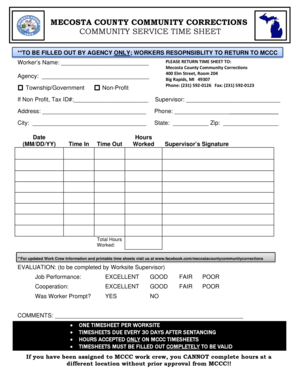
Get Mecosta County Community Corrections Community Service Time Sheet
How it works
-

Open form follow the instructions
-

Easily sign the form with your finger
-

Send filled & signed form or save
How to fill out the Mecosta County Community Corrections Community Service Time Sheet online
Completing the Mecosta County Community Corrections Community Service Time Sheet is essential for accurate record-keeping of community service hours. This guide will provide clear and concise steps to assist users in filling out the form effectively online.
Follow the steps to complete the community service time sheet accurately.
- Click ‘Get Form’ button to access the form and open it in the editor.
- Begin by entering the worker's name in the designated field. Ensure that the name matches the individual performing the community service.
- Next, indicate the agency associated with the community service. Select the appropriate option from 'Township/Government' or 'Non-Profit'.
- If opting for 'Non-Profit', provide the Tax ID number in the specified space to verify the organization.
- Fill in the supervisor's name who oversees the community service work. This should be a person responsible for evaluating the worker's performance.
- Enter the supervisor's address, including street, city, state, and zip code. This helps in identifying the supervisor's location in case of any inquiries.
- Provide a contact phone number for the supervisor to facilitate communication.
- Record the date of service in the MM/DD/YY format to ensure clarity on when the hours were worked.
- Document the time in and time out for each specified work session to accurately reflect the hours contributed.
- Calculate and enter the total hours worked in the corresponding field, summing up all hours logged.
- Ensure the supervisor signs the document, acknowledging their review and verification of the hours worked.
- At the bottom of the sheet, evaluate the worker’s job performance and cooperation by marking the appropriate boxes. The supervisor should also answer if the worker was prompt.
- Include any relevant comments that provide additional feedback regarding the worker’s performance.
- Before submitting, review the entire form for completeness and accuracy. Ensure all required fields are filled out fully.
- Once completed, you can save the changes, download, print, or share the form as necessary for submission.
Start filling out your community service time sheet online today for accurate reporting!
Get form
Experience a faster way to fill out and sign forms on the web. Access the most extensive library of templates available.
Get This Form Now!
Use professional pre-built templates to fill in and sign documents online faster. Get access to thousands of forms.