Loading
Get Au F3058 Cfd 2018
How it works
-

Open form follow the instructions
-

Easily sign the form with your finger
-

Send filled & signed form or save
How to fill out the AU F3058 CFD online
Filling out the AU F3058 CFD online can be a straightforward process if you follow the proper steps. This guide will provide you with detailed instructions on completing each section of the form with confidence.
Follow the steps to successfully complete the AU F3058 CFD.
- Click ‘Get Form’ button to obtain the form and open it in the editor.
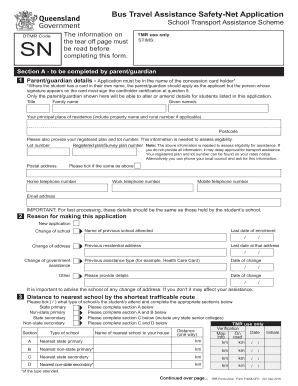
- Begin with Section A, where you will need to complete details about the parent or guardian. Ensure that the application is in the name of the concession card holder, as this is crucial for processing.
- Fill out the parent or guardian details including title, family name, given names, principal place of residence, postcode, and registered plan/lot number. This information is necessary to assess eligibility.
- Indicate the reason for making the application. Select options such as 'New application,' 'Change of school,' or 'Change of address' and provide required details for any of these changes.
- In Section 3, document the distance to the nearest school. Check what type of school the student attends and provide the necessary details accordingly, including the name of the nearest school and the distance.
- List the names of the students who are applying for bus travel assistance in Section 4. Accurately fill out their details to match school records.
- Complete Section 5 by providing details of any government assistance held by the applicant and each student. Ensure to include card numbers and other relevant information.
- In Section 6, indicate on which days the service will be used. Mark the corresponding days that students will travel and note the first date of travel.
- Provide names of any other students applying for assistance in Section 7, if applicable.
- Complete the certification at Section 8 by signing the declaration. Ensure that all information provided is true and accurate.
- After completing the form, check for any additional supporting documentation needed and make sure to attach it.
- Finally, save changes, download a copy of the completed form, print it if necessary, or share it as required to submit to the bus operator.
Complete your AU F3058 CFD online today and ensure a smooth application process!
Get form
Experience a faster way to fill out and sign forms on the web. Access the most extensive library of templates available.
Get This Form Now!
Use professional pre-built templates to fill in and sign documents online faster. Get access to thousands of forms.