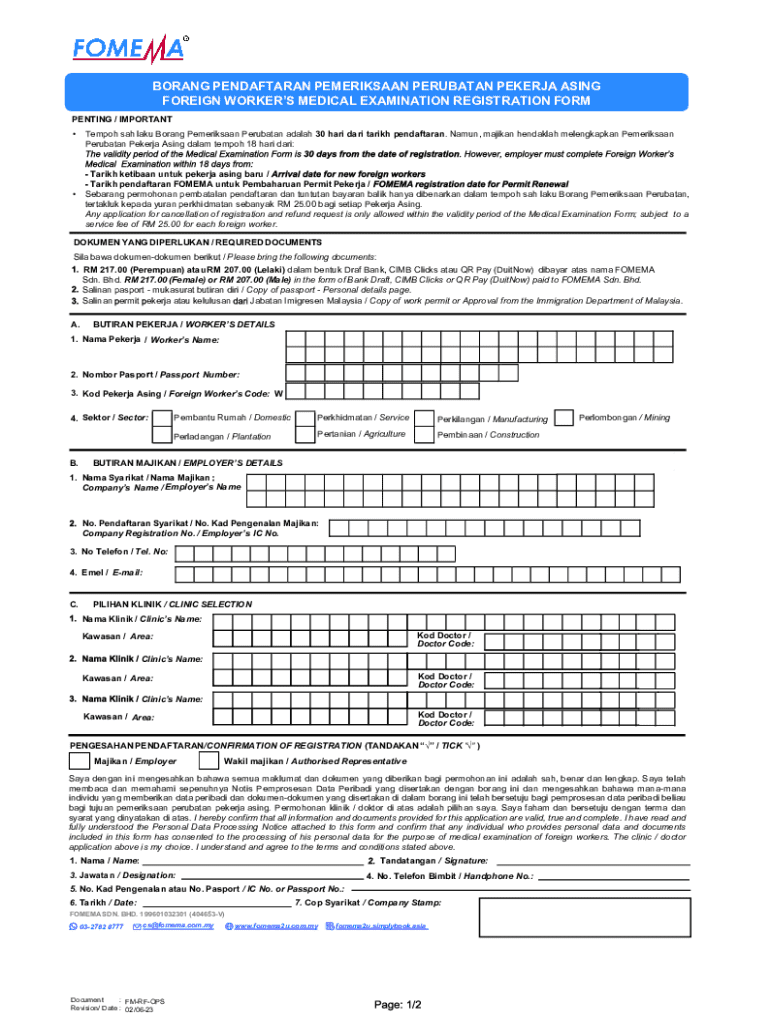
BORANG PENDAFTARAN PEMERIKSAAN PERUBATAN PEKERJA ASING FOREIGN WORKERS MEDICAL EXAMINATION REGISTRATION FORM PENTING / IMPORTANT Tempoh sah laku Borang Pemeriksaan Perubatan adalah 30 hari dari tarikh.
Loading

Open form follow the instructions

Easily sign the form with your finger

Send filled & signed form or save
How to fill out the MY FOMEMA FM-RF-OPS online
This guide provides a comprehensive overview of how to successfully complete the MY FOMEMA FM-RF-OPS form online. Whether you are a first-time user or have prior experience, this step-by-step approach will help you navigate through each section of the form with ease.
Follow the steps to complete your MY FOMEMA FM-RF-OPS form.
- Press the ‘Get Form’ button to access the MY FOMEMA FM-RF-OPS form and open it in the designated online platform.
- Begin by entering the worker's details in section A. Fill in the worker's name, passport number, foreign worker's code, and sector. Make sure to select the correct sector, such as domestic, manufacturing, plantation, agriculture, construction, or mining.
- Proceed to section B to provide the employer's details. Enter the company’s name, registration number, phone number, and email address.
- In section C, choose the preferred clinic for the medical examination. You will need to enter the clinic's name, doctor code, and area for each selected clinic.
- Confirm the registration by selecting whether the employer or the authorized representative is completing the form. Acknowledge that all information is accurate by ticking the appropriate box.
- Complete the signature section by providing the name, position, handphone number, identification or passport number, and the date. Ensure that the company stamp is affixed if required.
- Finalize your submission by reviewing all entered data for accuracy. Once confirmed, you have options to save changes, download, print, or share the completed form.
Complete your document online today to ensure a smooth medical examination process for foreign workers.
Experience a faster way to fill out and sign forms on the web. Access the most extensive library of templates available.
Related content
Small-scale enforcement operations such as Ops Sapu, Ops Ikrar, Ops Mahir, Ops Belanja and...
Get answers to your most pressing questions about US Legal Forms API.
How to check FOMEMA?
You can check FOMEMA by visiting their official website and entering the required information as prompted. This service allows you to verify your medical clearance status necessary for working in Malaysia. Utilizing MY FOMEMA FM-RF-OPS can offer additional support in managing your medical information and updates efficiently.
What are the medical tests for Malaysia work visa?
The medical tests for a Malaysia work visa typically include a chest X-ray, urine analysis, and blood tests among others. These tests ensure that you meet the health requirements set by the Malaysian authorities. Be sure to check with the MY FOMEMA FM-RF-OPS platform for detailed information on testing requirements specific to your situation.
How can I get a medical report in Malaysia?
You can obtain a medical report in Malaysia by visiting a registered clinic or hospital. Schedule an appointment for any necessary examinations, and once completed, the healthcare provider will issue the report. To stay updated with your health records, consider using MY FOMEMA FM-RF-OPS for easy tracking.
How can I check my work permit status online in Malaysia?
To check your work permit status online in Malaysia, visit the Immigration Department of Malaysia's official website. Enter your details in the specified fields to access your status. Leveraging the MY FOMEMA FM-RF-OPS tool can help streamline this verification process by consolidating necessary information at your fingertips.
How can I check my foreign worker medical report in Malaysia?
You can check your foreign worker medical report by visiting the official Ministry of Health Malaysia website or consulting your employer. They should provide access to the medical database where reports are available. Additionally, using the MY FOMEMA FM-RF-OPS service can simplify this process and keep your records organized.
How to get a check out memo in Malaysia?
To obtain a check out memo in Malaysia, you need to contact your employer or the relevant authorities directly. They will guide you on the specific requirements and documentation needed. It's crucial to ensure that your status and obligations are clear before proceeding. For added efficiency, consider using the MY FOMEMA FM-RF-OPS platform for tracking your requirements.
When to do fomema?
You should complete your MY FOMEMA FM-RF-OPS procedures before starting your employment in Malaysia. It is essential to initiate the FOMEMA process as soon as you receive a job offer. This ensures you meet the required health checks in a timely manner. Proper timing with MY FOMEMA FM-RF-OPS helps avoid potential delays in your employment start date.
How to check fomema in Malaysia?
To check your MY FOMEMA FM-RF-OPS status in Malaysia, you need to visit the official FOMEMA website. There, you can enter relevant details such as your identification number. This process will provide you with up-to-date information about your FOMEMA registration status. Using MY FOMEMA FM-RF-OPS makes this verification simple and efficient.
How to check fomema result?
To check your FOMEMA result, navigate to the FOMEMA website and log in with your personal details. The portal will show your health examination results clearly. Utilizing MY FOMEMA FM-RF-OPS allows you to access your health data conveniently, ensuring you are always informed.
How to renew a foreign worker permit in Malaysia?
Renewing your foreign worker permit in Malaysia involves completing the required application forms and submitting them to the Immigration Department. You should also gather necessary documents, such as your MY FOMEMA FM-RF-OPS health certificate. Make sure to start the process well before your permit expires to avoid any complications.
Use professional pre-built templates to fill in and sign documents online faster. Get access to thousands of forms.
If you believe that this page should be taken down, please follow our DMCA take down process here.