Loading
Get Louisville Metro Revenue Commission Forms
How it works
-

Open form follow the instructions
-

Easily sign the form with your finger
-

Send filled & signed form or save
How to fill out the Louisville Metro Revenue Commission Forms online
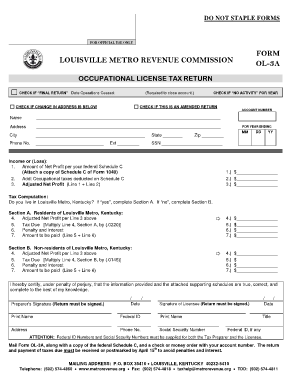
Filling out the Louisville Metro Revenue Commission forms online is a straightforward process that enables users to complete their occupational license tax return efficiently. This guide offers clear steps to help you navigate the form and ensure accurate submission.
Follow the steps to complete the form successfully.
- Click ‘Get Form’ button to access the form and open it in the editor.
- Begin by indicating if this is a final return by checking the appropriate box and filling in the date operations ceased, if applicable. This is essential for closing your tax account.
- Enter your Social Security Number and account number in the respective fields to identify your tax account. This is critical for efficient processing.
- Indicate your residency status. If you live in Louisville Metro, complete Section A; if not, complete Section B. Each section requires calculations based on your adjusted net profit.
- Sign the form in the designated areas. Both the preparer's signature and the licensee's signature are required along with the date of each signature.
- Save your changes to the form. Once completed, download it for your records, or print it for mailing. Ensure that you include a copy of your federal Schedule C along with the form for submission.
- Mail the completed form to the specified address and ensure that it is postmarked by April 15th to avoid penalties.
Complete your Louisville Metro Revenue Commission Forms online today to ensure timely and accurate filing!
Louisville Metro Revenue Commission Call 502-574-4860 Monday - Friday 8:00 a.m. to 5:00 p.m.