Loading
Form preview
  • US Legal Forms
  • Other Templates
  • More Forms
  • More Uncategorized Forms
  • U.s. Air Force Form Afmc315. Free Download

Get U.s. Air Force Form Afmc315. Free Download

This is a web-optimized version of this form. Download the original, full version: www.usa-federal-forms.com/download.html Convert any form into fillable, savable: www.fillable.com Learn how to use.

How it works

  1. Open form

    Open form follow the instructions

  2. Easily sign form

    Easily sign the form with your finger

  3. Share form

    Send filled & signed form or save

How to fill out the U.S. Air Force Form Afmc315. Free Download online

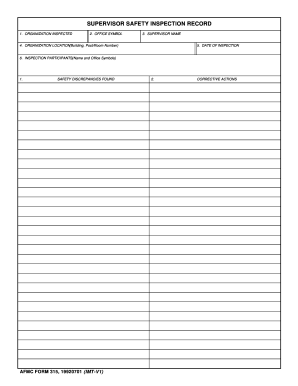
Filling out the U.S. Air Force Form Afmc315 is an essential task for documenting safety inspections within your organization. This guide provides a step-by-step approach to assist users in completing the form accurately and effectively.

Follow the steps to fill out the U.S. Air Force Form Afmc315 correctly.

  1. Click the ‘Get Form’ button to obtain the form and open it in your preferred document editor.
  2. Begin with section 1, ‘Organization inspected.’ Enter the name of the organization that is being inspected.
  3. In section 2, ‘Office symbol,’ input the designated office symbol associated with the inspection.
  4. For section 3, ‘Supervisor name,’ fill in the full name of the supervisor conducting the inspection.
  5. In section 4, ‘Organization location,’ specify the building and room number where the inspection took place.
  6. In section 5, ‘Date of inspection,’ write the date when the inspection was performed, using the format MM/DD/YYYY.
  7. For section 6, ‘Inspection participants,’ list the names and office symbols of all individuals who participated in the inspection.
  8. Proceed to document the ‘Safety discrepancies found’ in the appropriate area. Clearly describe any safety issues identified during the inspection.
  9. Next, state the ‘Corrective actions’ that will be taken to address each safety discrepancy noted in the previous step.
  10. Once you have completed all sections, review the form for accuracy. You can then save your changes, download, print, or share the form as needed.

Obtain your U.S. Air Force Form Afmc315 online and ensure your safety inspections are thoroughly documented.

Get form

Experience a faster way to fill out and sign forms on the web. Access the most extensive library of templates available.
Get form

Related content

Department of the Air Force E-Publishing >...
Forms. Air Force; Air National Guard; United States Space Force; Major Commands; Lead...
Learn more
AFI 11-2FT Vol 3 - Air Force - AF.mil
Mar 1, 2017 — AF Form 847, Recommendation for Change of Publication, through channels to...
Learn more
March Air Reserve Base - Wikipedia
March Air Reserve Base (March ARB), previously known as March Air Force Base (March AFB)...
Learn more

Related links form

Sample Letter Of Medical Necessity For Incontinence Supplies Prca Card NGSS Matrix Organized By Topics How To Fill Out Crt 61 Form

Questions & Answers

Get answers to your most pressing questions about US Legal Forms API.

Contact support

Air Force publications issue Air Force policy, guidance, and procedures that serve to inform and to assign responsibilities. Air Force forms provide an expanded capability to standardize and manage the collection, storage, retrieval, and display of data.

Copies of profile Forms 469 and 422 are sent to the active duty member's unit deployment manager, unit fitness program manager, and all commander designees. Airmen may pick up the final official copy of their profile from one of these unit members.

AF Form 422 / Medical Clearance Reviews for overseas clearance, job retraining, job reclassification, special duty, security clearance, Palace Chase, Palace Front, developmental special duty, commissioning and PME attendance.

Core Task column of the AF Form 797 indicates the individual must be trained and certified on. that particular task. The “X*” code identifies tasks that may not be common to all equipment or. functions; however, the task must be trained if it is assigned to the individual's duty position.

AF Documents means, with respect to each applicable AF Unit, the Plans, the Construction Documents, drawings, specifications, surveys, test results, models, plans, computer aided drafting and design, computer programs and other work product prepared by or for any Developer Party or its Affiliates, agents, contractors ...

Air Force publications issue Air Force policy, guidance, and procedures that serve to inform and to assign responsibilities. Air Force forms provide an expanded capability to standardize and manage the collection, storage, retrieval, and display of data.

AF Form 1297, Temporary Issue Receipt, is a document used to track temporary issues of all property, including equipment, military equipment, and other accountable property (e.g., administrative property, special tools, special test equipment).

How do you write a staff summary sheet? It should be a concise (preferably one page) summary of the package. It states the purpose, pertinent background information, rationale, and discussion necessary to justify the action desired. Show the action desired (Coord [Coordination], Appr [Approval], Sig [Signature]).

Get This Form Now!

Use professional pre-built templates to fill in and sign documents online faster. Get access to thousands of forms.
Get form
If you believe that this page should be taken down, please follow our DMCA take down processhere.
Get U.S. Air Force Form Afmc315. Free Download
Get form

Form categories

Real Estate
  • Home Sale
  • Deeds
  • Leases
  • Landlord Tenant
  • First Refusal Agreement
  • Lis Pendens
  • View all Real Estate
Business & Commercial
  • Small Business
  • Contracts
  • Construction
  • Employment
  • Limited Liability Company
  • Partnerships
  • View all Business & Commercial
Estate Planning
  • Personal Planning
  • Last Will and Testament
  • Living Trust
  • Power of Attorney
  • Living Will (Healthcare Directive)
  • Probate
  • Trusts
  • Small Estate
  • View all Estate Planning

Other Legal Areas

  • Civil Actions
  • Civil Procedure
  • Animals
  • Affidavits
  • Bill of Sale
  • Oil Gas and Minerals
  • Name Change
  • Other
Family Law
  • Divorce
  • Annulment
  • Adoption
  • Marriage
  • Child Justice
  • View all Family Law
  • Forms Catalog
  • Other Templates

Company

  • About Us
  • Pricing
  • Legal Hub
  • Affiliate Program

Knowledge Base

  • Help Portal
  • Legal Resources
  • Blog
  • Industries
  • Legal Guides
  • Sitemap

Services

  • Notarize
  • Form Selector

Support

  • Contact Us
  • Delete My Account

Products

  • USLegal
  • FormsPass
  • pdfFiller
  • signNow
  • altaFlow
  • DocHub
  • Instapage
Social Media
Call us now toll free:
+1 833 426 79 33
As seen in:
© 2026 US Legal Forms. All rights reserved.
  • Your Privacy Choices
  • Terms of Service
  • Privacy Notice
  • Content Takedown Policy
  • Bug Bounty Program