Loading
Get Wauseon City Income Tax
How it works
-

Open form follow the instructions
-

Easily sign the form with your finger
-

Send filled & signed form or save
How to fill out the Wauseon City Income Tax online
Filling out the Wauseon City Income Tax form online is an essential step for taxpayers to comply with local tax regulations. This guide provides clear, step-by-step instructions to help you navigate the form easily and accurately.
Follow the steps to complete your online income tax return.
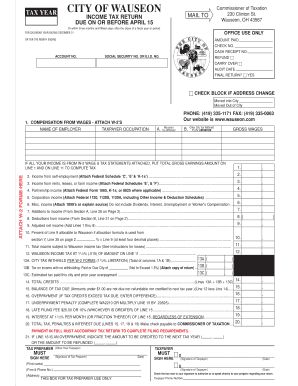
- Click 'Get Form' button to obtain the Wauseon City Income Tax form and access it in your preferred online editing tool.
- Begin by entering the date for the period covered by your return. If you are filing for a fiscal year, ensure that you specify the appropriate dates.
- Provide your name, address, social security number or employer identification number, and Wauseon tax account number if you have one.
- Fill in your phone number and the period during which you resided in Wauseon.
- For Line 1, input your wages and salaries as reported on your W-2 forms. If this is your only income, proceed to Line 11 and compute your tax liability.
- For Line 2, include any income from self-employment. If you have partnership income, ensure to fill out Section C on Page 2 and attach the necessary Schedule 'E' and K-1 forms.
- List any additional income, including rents, leases, and farm income, on Line 3. Attach any required documentation such as Schedule 'E' or 'F'.
- If applicable, report partnership income on Line 4 and include supporting forms.
- Corporation income should be reported on Line 5. Include a copy of the IRS forms filed with your corporation return.
- On Line 6, report any miscellaneous income and provide backup documents such as 1099 forms.
- Total all reported income from Lines 1 through 8 and enter the amount on Line 9.
- If an allocation formula is being applied, calculate the relevant percentage and enter it on Line 10.
- Input your total income subject to tax on Line 11 and compute the tax due on Line 12 by multiplying this amount by the tax rate.
- List any credits from Line 13(A), 13(B), and 13(C) on Line 14.
- Calculate the balance of tax due by subtracting Line 14 from Line 12 and enter on Line 15.
- If you have an overpayment, indicate this on Line 16.
- Complete Line 17 if underpayment penalties apply due to insufficient prior payments.
- Input any late fees on Line 18 if applicable.
- Calculate and enter any interest assessed on Line 19 for late payments.
- Total the amounts due, including penalties and interest, on Line 20.
- Ensure to complete and sign the form to validate your return submission. Attach all required documents as specified.
- Save changes, download your completed form, and consider printing or sharing it for your records.
Complete your Wauseon City Income Tax return online today to ensure compliance and avoid late penalties.
Yes. If you are a Detroit resident, all of your income is subject to Detroit tax, no matter where it is earned. See line-by-line Instructions for Form 5118, 2021 City of Detroit Resident Income Tax Return.