Loading
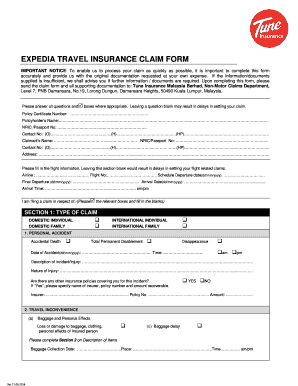
Get Expedia Travel Insurance Claim Form
How it works
-

Open form follow the instructions
-

Easily sign the form with your finger
-

Send filled & signed form or save
How to fill out the EXPEDIA TRAVEL INSURANCE CLAIM FORM online
Completing the Expedia travel insurance claim form accurately is essential to ensure a smooth claims process. This guide provides step-by-step instructions on how to fill out the form online, helping you navigate each section with clarity and confidence.
Follow the steps to complete your claim form effectively.
- Click ‘Get Form’ button to download the claim form and open it for editing. Ensure you have all necessary documentation at hand before starting.
- Begin by filling in your policy certificate number and the policyholder’s name. This information is crucial for identifying your policy.
- Enter the NRIC or passport number of the policyholder, along with contact numbers for both home and mobile. It is important to ensure these numbers are current for effective communication.
- Next, provide the claimant's information, repeating the process by including their NRIC or passport number and contact details. This section may be filled out by the person filing the claim on behalf of the insured.
- Complete the flight information section accurately. Include the airline, flight number, scheduled departure date, final departure date, arrival date, and arrival time. Missing this section may lead to delays in your claim.
- For Section 1, indicate the type of claim you are filing by checking the relevant boxes. This could be for personal accident, travel inconvenience, medical expenses, or other specified claims.
- For each claim type, provide the required details as specified. For personal accidents, include the date and time of the incident, a description, and any other insurance policies that may cover your incident.
- Continue to fill out Section 2, detailing the description of items claimed and the amounts associated. Attach any supporting documents such as purchase receipts or proof of purchase.
- In the declaration section, confirm the accuracy of your submitted information by signing and dating the form. This step is critical as it verifies your commitment to the truthfulness of the claim.
- Finally, review the checklist for supporting documents required based on the type of claim being made. Ensure you have all necessary documentation to prevent delays. Once satisfied, save the changes, download, print, or share the form per your requirements.
Ensure your claim is processed smoothly by completing the Expedia travel insurance claim form online today.
You purchased your policy within 15 days of requesting a refund from Travel Guard, You have not started your trip, and. You have not filed a claim.