Loading
Form preview
  • US Legal Forms
  • Other Templates
  • More Forms
  • More Multi-State Forms
  • Piedmont Hospital Discharge Papers

Get Piedmont Hospital Discharge Papers

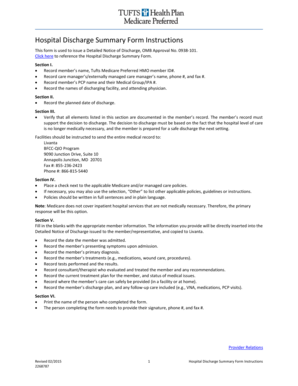
Hospital Discharge Summary Form Instructions This form is used to issue a Detailed Notice of Discharge, OMB Approval No. 0938101. Click here to reference the Hospital Discharge Summary Form. Section.

How it works

  1. Open form

    Open form follow the instructions

  2. Easily sign form

    Easily sign the form with your finger

  3. Share form

    Send filled & signed form or save

How to fill out the Piedmont Hospital Discharge Papers online

Filling out the Piedmont Hospital Discharge Papers is an essential process for ensuring a smooth transition from hospital care to the next steps in a person's health journey. This guide will provide you with step-by-step instructions to help you understand and complete the form efficiently and accurately.

Follow the steps to complete the discharge papers with ease.

  1. Press the ‘Get Form’ button to access the necessary form and open it for filling out.
  2. Begin by entering the member’s full name along with their Tufts Medicare Preferred HMO member ID number in Section I.
  3. Then, provide the care manager’s name, phone number, and fax number, followed by the name of the member's primary care physician and their Medical Group/IPA number.
  4. Next, record the names of the discharging facility and the attending physician also in Section I.
  5. In Section II, document the planned date of discharge for the member.
  6. Proceed to Section III and ensure that all critical elements listed are substantiated in the member's record. This must include verification that the decision to discharge is based on medical necessity.
  7. Ensure to send the entire medical record to Livanta, as indicated in the instructions, including the appropriate contact information.
  8. In Section IV, check the relevant Medicare and/or managed care policies applicable to the discharge. If needed, specify any additional guidelines utilizing the ‘Other’ selection.
  9. In Section V, fill in the blanks with crucial member information that will be included in the Detailed Notice of Discharge. This includes the admission date, presenting symptoms, primary diagnosis, treatments, tests performed, recommendations from consultants, the current treatment plan, care provisions, and the discharge plan.
  10. Finally, in Section VI, print the name of the individual completing the form and provide their signature, phone number, and fax number.

Complete the Piedmont Hospital Discharge Papers online today to ensure a seamless care transition.

Get form

Experience a faster way to fill out and sign forms on the web. Access the most extensive library of templates available.
Get form

Related content

[Use of Hospital Discharge Records to Estimate the...
by A Stura · 2007 · Cited by 5 — Objective: to assess the usefullness of Hospital...
Learn more
Grady Hospital, blank patient release forms...
Grady Hospital, blank patient release forms, undated · Collection organization · Scope...
Learn more
Georgia FY22 Highway Safety Plan
Nov 15, 2021 — Total (percent) of crash records linked to hospital discharge records...
Learn more

Related links form

Standard Bidding Documents - Ministry Of Works And Human ... Iso 8062 4 SAMPLE - Disclaimer Trust.doc Conflict Management Styles Assessment - The Blake Group

Questions & Answers

Get answers to your most pressing questions about US Legal Forms API.

Contact support

To call Piedmont Hospital in Atlanta, simply dial their main phone number, which you can find on the official Piedmont website. Be prepared to navigate through the automated system to reach the appropriate department. If you need assistance with your Piedmont Hospital Discharge Papers, ask to be connected to the medical records department or patient services for help.

The easiest way to obtain your medical records, including Piedmont Hospital Discharge Papers, is through the online patient portal. This platform allows for quick access to your health information and makes it simple to request documents. Alternatively, you can visit the hospital's medical records department in person if you prefer a more direct approach.

When writing a request for medical records, include your full name, contact information, and specific details about the records you need, such as Piedmont Hospital Discharge Papers. Clearly state the purpose of your request, whether for personal health management or legal reasons. You can send the request via mail, fax, or electronically, depending on Piedmont's guidelines.

Yes, you can receive care at Piedmont even if you do not have insurance. Piedmont offers a range of services to ensure that everyone can access necessary medical treatment. It’s advisable to discuss any payment arrangements with the hospital staff, especially if you require your Piedmont Hospital Discharge Papers after treatment.

To obtain your medical records from Piedmont, you can visit their patient portal online or submit a form directly to the medical records department. Ensure that you have proper identification and complete any required forms. Additionally, you may request your Piedmont Hospital Discharge Papers specifically, which detail your treatment and discharge information.

To obtain medical records from Atlanta Medical Center, you need to submit a request in writing. You can either visit the hospital's records department or use their online system. Ensure you include relevant details such as your identification and the dates of service. The process may take some time, but you'll eventually receive access to your Piedmont Hospital Discharge Papers.

In Georgia, you can request medical records by contacting the healthcare provider directly or through their website. Each hospital, including Piedmont, may have specific procedures in place. Be prepared to provide necessary information such as identification, dates of service, and any pertinent details related to your Piedmont Hospital discharge papers.

The easiest way to request medical records is often through the hospital's online patient portal. Many facilities, including those associated with Piedmont, provide a simple process for requesting and obtaining records digitally. Alternatively, you may also call the medical records department directly for assistance in retrieving your Piedmont Hospital discharge papers.

Hospital discharge summaries serve as the primary documents communicating a patient's care plan to the post-hospital care team. 1, 2. Often, the discharge summary is the only form of communication that accompanies the patient to the next setting of care. 1.

Discharge papers are physical documentation of the patient's stay that also includes instructions for treatment and follow-up care. The key components of hospital discharge papers include the following: The reason the patient was hospitalized that includes a detailed description of the primary condition being treated.

Get This Form Now!

Use professional pre-built templates to fill in and sign documents online faster. Get access to thousands of forms.
Get form
If you believe that this page should be taken down, please follow our DMCA take down processhere.
Get Piedmont Hospital Discharge Papers
Get form
  • Adoption
  • Bankruptcy
  • Contractors
  • Divorce
  • Home Sales
  • Employment
  • Identity Theft
  • Incorporation
  • Landlord Tenant
  • Living Trust
  • Name Change
  • Personal Planning
  • Small Business
  • Wills & Estates
  • Packages A-Z
  • Affidavits
  • Bankruptcy
  • Bill of Sale
  • Corporate - LLC
  • Divorce
  • Employment
  • Identity Theft
  • Internet Technology
  • Landlord Tenant
  • Living Wills
  • Name Change
  • Power of Attorney
  • Real Estate
  • Small Estates
  • Wills
  • All Forms
  • Forms A-Z
  • Other Templates
  • Legal Hub
  • About Us
  • Help Portal
  • Legal Resources
  • Blog
  • Affiliates
  • Contact Us
  • Delete My Account
  • Site Map
  • Industries
  • Forms in Spanish
  • Localized Forms
  • State-specific Forms
  • Forms Kit
  • Real Estate Handbook
  • All Guides
  • Notarize
  • Incorporation services
  • For Consumers
  • For Small Business
  • For Attorneys
  • USLegal
  • FormsPass
  • pdfFiller
  • signNow
  • altaFlow
  • DocHub
  • Instapage
Form Packages
  • Adoption
  • Bankruptcy
  • Contractors
  • Divorce
  • Home Sales
  • Employment
  • Identity Theft
  • Incorporation
  • Landlord Tenant
  • Living Trust
  • Name Change
  • Personal Planning
  • Small Business
  • Wills & Estates
  • Packages A-Z
Form Categories
  • Affidavits
  • Bankruptcy
  • Bill of Sale
  • Corporate - LLC
  • Divorce
  • Employment
  • Identity Theft
  • Internet Technology
  • Landlord Tenant
  • Living Wills
  • Name Change
  • Power of Attorney
  • Real Estate
  • Small Estates
  • Wills
  • All Forms
  • Forms A-Z
  • Other Templates
Customer Service
  • Legal Hub
  • About Us
  • Help Portal
  • Legal Resources
  • Blog
  • Affiliates
  • Contact Us
  • Delete My Account
  • Site Map
  • Industries
  • Forms in Spanish
  • Localized Forms
  • State-specific Forms
  • Forms Kit
Legal Guides
  • Real Estate Handbook
  • All Guides
Prepared for you
  • Notarize
  • Incorporation services
Our Customers
  • For Consumers
  • For Small Business
  • For Attorneys
Our Sites
  • USLegal
  • FormsPass
  • pdfFiller
  • signNow
  • altaFlow
  • DocHub
  • Instapage
Social Media
Call us now toll free:
+1 833 426 79 33
As seen in:
© Copyright 1999-2026 airSlate Legal Forms, Inc. 17 Station Street, Ste. 203, Brookline, MA 02445
  • Your Privacy Choices
  • Terms of Service
  • Privacy Notice
  • Content Takedown Policy
  • Bug Bounty Program