Loading
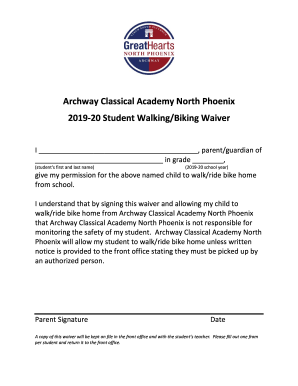
Get Great Hearts Academies Student Walking/biking Waiver 2019-2026
How it works
-

Open form follow the instructions
-

Easily sign the form with your finger
-

Send filled & signed form or save
How to fill out the Great Hearts Academies Student Walking/Biking Waiver online
Filling out the Great Hearts Academies Student Walking/Biking Waiver is a straightforward process that requires input from a parent or guardian. This guide will walk you through each step to ensure that you complete the waiver accurately and confidently.
Follow the steps to successfully complete the waiver.
- Click the ‘Get Form’ button to obtain the waiver and open it in the online editor.
- Begin filling out the form by entering your name as the parent or guardian in the designated field. Be sure to spell your name correctly.
- Next, input the full name of the student for whom you are granting permission to walk or bike home from school. This should include the student’s first and last name.
- Specify the current grade of the student by selecting or typing the corresponding grade level in the appropriate field.
- In the following section, read the statement regarding your understanding of the waiver. This signifies that you acknowledge that Archway Classical Academy North Phoenix will not be responsible for monitoring your child's safety.
- After reviewing the statement, provide your electronic signature in the designated field to authorize the waiver. This should be done by the parent or guardian.
- Finally, enter the date on which you are completing this form. Make sure this is the current date.
- Once all fields are completed, save your changes. You can also choose to download, print, or share the completed waiver as needed.
Complete the Great Hearts Academies Student Walking/Biking Waiver online today to ensure your child's safe and independent travel from school.