Loading
Form preview
  • US Legal Forms
  • Other Templates
  • More Forms
  • More Uncategorized Forms
  • Application Update Form - Admission - Clayton State University - Admissions Clayton

Get Application Update Form - Admission - Clayton State University - Admissions Clayton

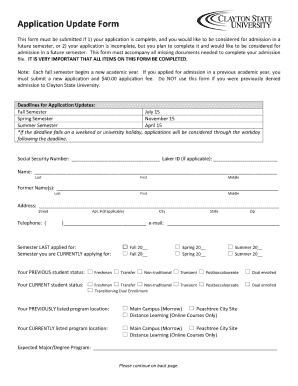
Application Update Form This form must be submitted if 1) your application is complete, and you would like to be considered for admission in a future semester, or 2) your application is incomplete,.

How it works

  1. Open form

    Open form follow the instructions

  2. Easily sign form

    Easily sign the form with your finger

  3. Share form

    Send filled & signed form or save

How to use or fill out the Application Update Form - Admission - Clayton State University - Admissions Clayton online

Completing the Application Update Form for admission at Clayton State University is an important step in ensuring that your application reflects your most current information. This guide will provide you with a clear and detailed roadmap to help you fill out the form accurately and efficiently.

Follow the steps to successfully complete your application update form.

  1. Click the ‘Get Form’ button to obtain the form and open it in your preferred online editor.
  2. Begin by entering your personal information in the designated fields. This typically includes your full name, date of birth, and contact information. Ensure that all details are accurate and up to date.
  3. In the section for educational history, provide information about your previous institutions. Include the names of schools attended, dates of attendance, and any degrees or certifications earned. This helps the admissions team understand your academic background.
  4. Update any additional information as required. This may include details about your current enrollment status or changes in your intended major. Make sure to review this section carefully.
  5. Review the entire form for accuracy. Check for spelling errors or missing information, as these can delay the processing of your application.
  6. Once all sections are completed and reviewed, you can save your changes. Look for the option to download, print, or share the form as needed to ensure you have a copy for your records.

Take action now and complete your Application Update Form online to stay on track with your admission process.

Get form

Experience a faster way to fill out and sign forms on the web. Access the most extensive library of templates available.
Get form

Related content

Clayton State University: Home
Discover how Clayton State University makes dreams real. Read alumni stories. See our...
Learn more
Application Update Form - Clayton State University
Application Update. Use this form to change the information you originally submitted with...
Learn more
Palliative Care - Urology Guidelines
Feb 16, 2024 — These NCCN guidelines cover palliative care, including definition...
Learn more

Related links form

DHS-6426-ENG 9-11 Minnesota Health Care Programs MHCP Application For Transcript Of Academic Record Andor - ANU 4 INDIANINSTITUTEOFTECHNOLOGY,ROORKEE ROORKEE MEDICAL EXAMINATION REPORT (To Be Issued By A Concord Municipal Light Plant - Concordnetorg

Questions & Answers

Get answers to your most pressing questions about US Legal Forms API.

Contact support

You can easily check the status of your Clayton State application by accessing the admissions portal. Once you log in, you will find updates on your application status and any pending requirements. To ensure you are on track, keep your Application Update Form - Admission - Clayton State University - Admissions Clayton completed and submitted.

To check the status of your application, visit the university’s admissions portal, where you can log in with your credentials to see updates. Keeping track of your status is vital, especially as vital deadlines approach. If you're submitting additional materials, the Application Update Form - Admission - Clayton State University - Admissions Clayton ensures everything is accounted for.

While Clayton State University is moderately competitive, it is not deemed overly difficult to gain admission. By meeting the entrance criteria and submitting a complete Application Update Form - Admission - Clayton State University - Admissions Clayton, you enhance your chances significantly. Every applicant is considered holistically, which opens opportunities for a range of students.

You can email the admissions office at Clayton State University by using their official email address listed on their website. When you write your email, be sure to include your full name and any relevant details about your application. This will help them respond more effectively. If you are following up on your status, utilize the Application Update Form - Admission - Clayton State University - Admissions Clayton.

To check your application status at Ohio University, log into their admissions portal using your credentials. From there, you can view your application status and any additional requirements you may need to fulfill. If you are looking specifically for Clayton State University’s application, the Application Update Form - Admission - Clayton State University - Admissions Clayton is the right approach.

Entering Clayton State University is moderately competitive due to its acceptance rate and comprehensive evaluation of applicants. Factors like high school GPA, standardized test scores, and personal statements play significant roles in the admission process. To strengthen your application, ensure you submit a complete Application Update Form - Admission - Clayton State University - Admissions Clayton, showcasing your qualifications.

Clayton State University has an acceptance rate of approximately 52%, which means that more than half of applicants receive offers of admission. This statistic reflects the university's commitment to encouraging a diverse student body. For those looking to pursue higher education, the Application Update Form - Admission - Clayton State University - Admissions Clayton can be a valuable resource.

The application deadline for Clayton State University varies depending on the semester you wish to start. Typically, for the fall semester, the deadline falls around July 15, while deadlines for spring and summer semesters are usually earlier in the year. Be sure to check the university's Admissions page for the most current information regarding the Application Update Form - Admission - Clayton State University - Admissions Clayton.

To contact the ECU admissions office via email, check the official ECU website for their admissions contact details. Locate the specific email address designated for inquiries. Mention your Application Update Form - Admission - Clayton State University - Admissions Clayton in the subject line for clarity.

You can email the Clayton State University admissions office by visiting their website and locating the contact section. They provide an email address specifically for admissions inquiries. When emailing, make sure to reference your Application Update Form - Admission - Clayton State University - Admissions Clayton to ensure a prompt response.

Get This Form Now!

Use professional pre-built templates to fill in and sign documents online faster. Get access to thousands of forms.
Get form
If you believe that this page should be taken down, please follow our DMCA take down processhere.
Get Application Update Form - Admission - Clayton State University - Admissions Clayton
Get form
  • Adoption
  • Bankruptcy
  • Contractors
  • Divorce
  • Home Sales
  • Employment
  • Identity Theft
  • Incorporation
  • Landlord Tenant
  • Living Trust
  • Name Change
  • Personal Planning
  • Small Business
  • Wills & Estates
  • Packages A-Z
  • Affidavits
  • Bankruptcy
  • Bill of Sale
  • Corporate - LLC
  • Divorce
  • Employment
  • Identity Theft
  • Internet Technology
  • Landlord Tenant
  • Living Wills
  • Name Change
  • Power of Attorney
  • Real Estate
  • Small Estates
  • Wills
  • All Forms
  • Forms A-Z
  • Other Templates
  • Legal Hub
  • About Us
  • Help Portal
  • Legal Resources
  • Blog
  • Affiliates
  • Contact Us
  • Delete My Account
  • Site Map
  • Industries
  • Forms in Spanish
  • Localized Forms
  • State-specific Forms
  • Forms Kit
  • Real Estate Handbook
  • All Guides
  • Notarize
  • Incorporation services
  • For Consumers
  • For Small Business
  • For Attorneys
  • USLegal
  • FormsPass
  • pdfFiller
  • signNow
  • altaFlow
  • DocHub
  • Instapage
Form Packages
  • Adoption
  • Bankruptcy
  • Contractors
  • Divorce
  • Home Sales
  • Employment
  • Identity Theft
  • Incorporation
  • Landlord Tenant
  • Living Trust
  • Name Change
  • Personal Planning
  • Small Business
  • Wills & Estates
  • Packages A-Z
Form Categories
  • Affidavits
  • Bankruptcy
  • Bill of Sale
  • Corporate - LLC
  • Divorce
  • Employment
  • Identity Theft
  • Internet Technology
  • Landlord Tenant
  • Living Wills
  • Name Change
  • Power of Attorney
  • Real Estate
  • Small Estates
  • Wills
  • All Forms
  • Forms A-Z
  • Other Templates
Customer Service
  • Legal Hub
  • About Us
  • Help Portal
  • Legal Resources
  • Blog
  • Affiliates
  • Contact Us
  • Delete My Account
  • Site Map
  • Industries
  • Forms in Spanish
  • Localized Forms
  • State-specific Forms
  • Forms Kit
Legal Guides
  • Real Estate Handbook
  • All Guides
Prepared for you
  • Notarize
  • Incorporation services
Our Customers
  • For Consumers
  • For Small Business
  • For Attorneys
Our Sites
  • USLegal
  • FormsPass
  • pdfFiller
  • signNow
  • altaFlow
  • DocHub
  • Instapage
Social Media
Call us now toll free:
+1 833 426 79 33
As seen in:
© Copyright 1999-2026 airSlate Legal Forms, Inc. 17 Station Street, Ste. 203, Brookline, MA 02445
  • Your Privacy Choices
  • Terms of Service
  • Privacy Notice
  • Content Takedown Policy
  • Bug Bounty Program