Loading
Form preview
  • US Legal Forms
  • Form Library
  • More Forms
  • More Uncategorized Forms
  • Application For Transcript Of Academic Record Andor - Anu

Get Application For Transcript Of Academic Record Andor - Anu

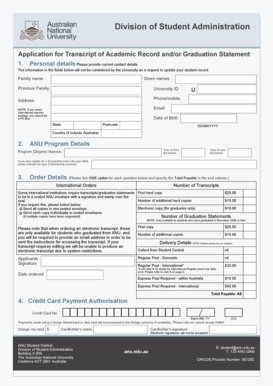
Division of Student Administration Application for Transcript of Academic Record and/or Graduation Statement 1. Personal details Please provide current contact details. The information in the fields.

How it works

  1. Open form

    Open form follow the instructions

  2. Easily sign form

    Easily sign the form with your finger

  3. Share form

    Send filled & signed form or save

How to fill out the Application For Transcript Of Academic Record Andor - ANU online

This guide provides a comprehensive overview of how to complete the Application For Transcript Of Academic Record Andor for the Australian National University (ANU) online. By following these steps, users can ensure their application is filled out correctly, leading to a smooth processing experience.

Follow the steps to successfully complete the application.

  1. Click ‘Get Form’ button to access the form and open it in the document editor for completion.
  2. Begin by entering your personal details. Fill in your current family name, given names, and if applicable, your previous family name. Next, provide your University ID, address, phone or mobile number, email, and date of birth in the specified format (DD/MM/YYYY), along with your state, postcode, and country if outside Australia.
  3. In the ANU program details section, specify the year of your first and last enrollment at the university. If you received a scholarship before 2000, indicate the type of scholarship in the provided field.
  4. For order details, select one option for each order type required. Specify the number of transcripts and graduation statements you wish to order, ensuring you understand options for sealed envelopes if required by institutions.
  5. Complete the payment section by entering your credit card number, expiry date, and CCV. Confirm the total amount payable based on your selections above, and include your cardholder’s name along with a signature (note that electronic signatures are not accepted).
  6. Review all provided information for accuracy. Once confirmed, save the changes. You may download, print, or share the completed form as necessary before submitting your application.

Complete your application online today to ensure you receive your academic records without delay.

Get form

Experience a faster way to fill out and sign forms on the web. Access the most extensive library of templates available.
Get form

Related content

ED 314 549 AUTHOR TITLE SPONS AGENCY PUB ......
Education of the Disadvantaged" (W. Secada); (7) "Mathematics. Education, the ... Their...
Learn more
2017–18 University Catalog - University of...
Jun 15, 2017 — character research achievements bring to undergraduate education. It is...
Learn more

Related links form

Manitoba Commissioner For Oaths Renewal Form Sba Form 160 St101 2020 Msaa Mri Diagnostic Fund Form

Questions & Answers

Get answers to your most pressing questions about US Legal Forms API.

Contact support

To get an official copy of your transcript, contact your school's registrar. In most cases, you don't even have to call or go in person; the registrar's office may have an online form for requesting your transcript. You can usually pay the transcript fee online too.

Delivery Type Electronic credentials are delivered as soon as the sending institution processes the request, often within one business day. Printed Transcript requests will typically be mailed within 1 business day. Processing time for printed diplomas is 7-21 business days.

Most colleges allow you to order copies of transcripts online, by mail, or in person via the office of admissions or registrar's office. You'll complete a transcript request form, pay a small fee, and may have to provide proof of identification.

Transcripts are generated by the education board of conduct, which can be received from the academic institute where you have pursued your education. These may either be procured by visiting the institution physically or by contacting the authorities and requesting them to send them via post.

- 2. Purchase documents after the Graduation Period: [show details] Log into ISIS using your ANU ID number and password; Follow the pathway: NavBar (compass icon) > Navigator > ISIS > Academic Records > Request a Transcript; Follow the prompts to complete your purchase;

In order for transcripts to be considered official they must be: Printed on security paper directly and/or displaying an official raised seal from the college or university, per the institutions standard practice.

How to order an electronic academic transcript Using the 'request a transcript' button on your ISIS homepage, or. Clicking the NavBar (compass icon) then Navigator > ISIS > Personal Details > Academic Records > Request a Transcript.

To obtain your UAB BS/MS/DPT transcript, please contact UAB's One Stop at 205-934-4300, or you can order a transcript online.

Clicking the NavBar (compass icon) then Navigator > ISIS > Personal Details > Academic Records > Request a Transcript.

Step 1: Please go to: .transcripts.wsu.edu in your web browser. Step 2: Click “here” to begin your online transcript order. Step 3: Click “Begin Order” to proceed with the online ordering process. Online ordering is generally very quick and it should not take long to place your order.

Get This Form Now!

Use professional pre-built templates to fill in and sign documents online faster. Get access to thousands of forms.
Get form
If you believe that this page should be taken down, please follow our DMCA take down processhere.
Get Application For Transcript Of Academic Record Andor - ANU
Get form
  • Adoption
  • Bankruptcy
  • Contractors
  • Divorce
  • Home Sales
  • Employment
  • Identity Theft
  • Incorporation
  • Landlord Tenant
  • Living Trust
  • Name Change
  • Personal Planning
  • Small Business
  • Wills & Estates
  • Packages A-Z
  • Affidavits
  • Bankruptcy
  • Bill of Sale
  • Corporate - LLC
  • Divorce
  • Employment
  • Identity Theft
  • Internet Technology
  • Landlord Tenant
  • Living Wills
  • Name Change
  • Power of Attorney
  • Real Estate
  • Small Estates
  • Wills
  • All Forms
  • Forms A-Z
  • Form Library
  • Legal Hub
  • About Us
  • Help Portal
  • Legal Resources
  • Blog
  • Affiliates
  • Contact Us
  • Delete My Account
  • Site Map
  • Industries
  • Forms in Spanish
  • Localized Forms
  • State-specific Forms
  • Forms Kit
  • Real Estate Handbook
  • All Guides
  • Notarize
  • Incorporation services
  • For Consumers
  • For Small Business
  • For Attorneys
  • USLegal
  • FormsPass
  • pdfFiller
  • signNow
  • altaFlow
  • DocHub
  • Instapage
Form Packages
  • Adoption
  • Bankruptcy
  • Contractors
  • Divorce
  • Home Sales
  • Employment
  • Identity Theft
  • Incorporation
  • Landlord Tenant
  • Living Trust
  • Name Change
  • Personal Planning
  • Small Business
  • Wills & Estates
  • Packages A-Z
Form Categories
  • Affidavits
  • Bankruptcy
  • Bill of Sale
  • Corporate - LLC
  • Divorce
  • Employment
  • Identity Theft
  • Internet Technology
  • Landlord Tenant
  • Living Wills
  • Name Change
  • Power of Attorney
  • Real Estate
  • Small Estates
  • Wills
  • All Forms
  • Forms A-Z
  • Form Library
Customer Service
  • Legal Hub
  • About Us
  • Help Portal
  • Legal Resources
  • Blog
  • Affiliates
  • Contact Us
  • Delete My Account
  • Site Map
  • Industries
  • Forms in Spanish
  • Localized Forms
  • State-specific Forms
  • Forms Kit
Legal Guides
  • Real Estate Handbook
  • All Guides
Prepared for you
  • Notarize
  • Incorporation services
Our Customers
  • For Consumers
  • For Small Business
  • For Attorneys
Our Sites
  • USLegal
  • FormsPass
  • pdfFiller
  • signNow
  • altaFlow
  • DocHub
  • Instapage
Social Media
Call us now toll free:
+1 833 426 79 33
As seen in:
© Copyright 1999-2026 airSlate Legal Forms, Inc. 3720 Flowood Dr, Flowood, Mississippi 39232
  • Your Privacy Choices
  • Terms of Service
  • Privacy Notice
  • Content Takedown Policy
  • Bug Bounty Program