Loading
Get What Is An Eng 3180 Form For Certified Payrolls 2020-2026
How it works
-

Open form follow the instructions
-

Easily sign the form with your finger
-

Send filled & signed form or save
How to fill out the What Is An Eng 3180 Form For Certified Payrolls online
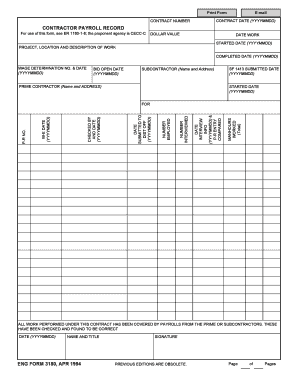
The Eng 3180 form is essential for reporting certified payrolls on federal-aid construction projects. This guide will provide clear instructions on how to complete the form accurately and efficiently online, ensuring compliance with payroll reporting requirements.
Follow the steps to successfully complete your Eng 3180 form online.
- Click ‘Get Form’ button to obtain the form and open it in your editing platform.
- Enter the contract date in the format YYYYMMDD. This is the date the contract was initiated.
- Fill in the contract number. This number is unique to your project and is critical for identification.
- Complete the contractor payroll record section. Include the dollar value of the contract and indicate the date work started, also in YYYYMMDD format.
- Provide a detailed description of the project, along with its location, and the completed date in YYYYMMDD format.
- Include the wage determination number and its effective date (YYYYMMDD). This information relates to the wages paid in accordance with federal guidelines.
- Enter the bid open date (YYYYMMDD), which marks when bids for the contract were formally opened.
- List the name and address of the subcontractor, if applicable. Also, complete the prime contractor section with their details.
- Specify the date when the SF 1413 was submitted (YYYYMMDD). This form is used for the report of wages for various projects.
- Document the total manhours worked and fill out the interview information as necessary, including the date and details of individuals interviewed.
- Indicate the number of employees interviewed and number employed under the contract.
- Complete the section detailing when the form was submitted to the district office, including the date (YYYYMMDD).
- Finish by stating who checked the payroll records and the date of verification (YYYYMMDD).
- Lastly, sign the form in the designated area and ensure all pages have been completed before finalizing.
- Save any changes made, then proceed to download, print, or share the form as needed.
Begin filling out your Eng 3180 form online today to ensure timely and compliant payroll reporting.