Loading
Form preview
  • US Legal Forms
  • Other Templates
  • Tax Forms
  • South Carolina Tax Forms
  • Sc Pt-300a 2020

Get Sc Pt-300a 2020

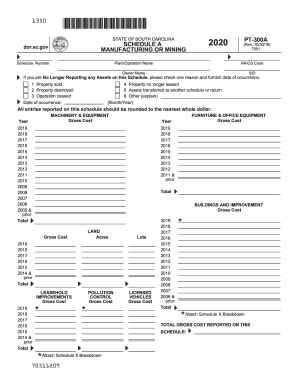
SID If you are No Longer Reporting any Assets on this Schedule, please check one reason and furnish date of occurrence. 1 Property sold 2 Property destroyed 3 Operation ceased Date of occurrence: 4 Property no longer leased 5 Assets transferred to another schedule or return 6 Other (explain) (Month/Year) All entries reported on this schedule should be rounded to the nearest whole dollar. MACHINERY & EQUIPMENT Gross Cost Year FURNITURE & OFFICE EQUIPMENT Gross Cost Year 2019 2018 2017 201.

How it works

  1. Open form

    Open form follow the instructions

  2. Easily sign form

    Easily sign the form with your finger

  3. Share form

    Send filled & signed form or save

How to fill out the SC PT-300A online

The SC PT-300A is a crucial form used for reporting manufacturing or mining assets in South Carolina. This guide will provide you with a clear, step-by-step approach to completing the form online, ensuring a smooth and accurate submission process.

Follow the steps to successfully complete the SC PT-300A online.

  1. Press the ‘Get Form’ button to access the SC PT-300A form and open it in the online editor.
  2. Begin by entering the 'Schedule Number' and the year for which you are reporting, as indicated at the top of the form.
  3. Input the 'Plant/Operation Name' followed by the corresponding 'NAICS Code' and 'Owner Name'. Ensure all information is accurate and corresponds to your assets.
  4. If you are no longer reporting any assets on this schedule, select one of the provided reasons and include the 'Date of occurrence' as needed.
  5. In the 'Machinery & Equipment' section, report the 'Gross Cost' of your assets for each year listed, rounding to the nearest whole dollar.
  6. Continue to fill in the 'Furniture & Office Equipment', 'Buildings and Improvement', 'Land', 'Leasehold Improvements', and 'Pollution Control' sections similarly, ensuring total amounts are calculated for each section.
  7. Detail the 'Licensed Vehicles' Gross Cost following the same guidelines as previous sections.
  8. Review the ‘Total Gross Cost Reported on This Schedule’ at the bottom to ensure all previous totals are accurately summed.
  9. Once all sections are completed thoroughly, you may have the option to save changes, download, print, or share the completed form.

Take the next step in your asset reporting by completing the SC PT-300A online today.

Get form

Experience a faster way to fill out and sign forms on the web. Access the most extensive library of templates available.

Related content

PT-300 A - SC Department of Revenue - South...
If you are no longer reporting any assets on the schedule, check one reason and furnish...
Learn more
Property Tax and Fee In Lieu Schedules and...
The filing of the PT-300 and the applicable schedules within the time prescribed by law...
Learn more
Guia do Utilizador - SC-R5000 Series/SC-R5000L...
O comprador deste produto ou terceiros não podem responsabilizar a Seiko Epson...
Learn more

Related links form

GA Bar Unlicensed Practice Of Law Complaint Form 2017 OR Instructions For Filing Small Estate Affidavit 2020 LA Lease Termination Letter HI 5-Day Notice To Pay Rent Or Quit The Premises 2016

Questions & Answers

Get answers to your most pressing questions about US Legal Forms API.

Contact support

The PT-100 form must be filed by all businesses in South Carolina that own personal property utilized in their operations. This includes equipment, machinery, furniture, and other items deemed taxable. Filing accurately ensures that your business stays compliant with local tax regulations. To streamline this process, you may also refer to the SC PT-300A for related tax obligations.

The PT-100 form in South Carolina is a crucial filing for business personal property tax. It is used by businesses to report the value of personal property they own. Filing this form helps maintain compliance with state tax laws, ensuring that you're taxed correctly. Understanding the implications of the SC PT-300A can give you additional insights into property assessments.

Filling out an Employee's Withholding Exemption Certificate in South Carolina requires you to provide personal and financial information that determines your withholding exemptions. Ensure you understand your filing status and any applicable deductions. By accurately completing the form, you can optimize your tax situation. For related tax forms, the SC PT-300A can provide clarity on property tax considerations.

To file a PT100 in South Carolina, you first need to gather all required documentation related to your property. Fill out the PT100 form with accurate information about your assets, and make sure to double-check for completeness. After preparing the form, submit it to your local assessor's office. For assistance, you can refer to resources like the SC PT-300A form, which guides property tax filing.

Filing a PT100 in South Carolina is a straightforward process. Start by obtaining the form from your county's tax office or online resources. Fill out the necessary information, ensuring all details are accurate, and then submit it to the appropriate county office. Using the SC PT-300A can help you understand any additional steps needed during this process.

Calculating business personal property tax in South Carolina involves assessing the value of your business assets, including equipment and inventory. You can use the SC PT-300A form for reporting these values to ensure accurate calculations. The local tax office will utilize this information to determine your tax obligation. It’s important to keep updated records to simplify this process.

To qualify for the 4% property tax rate in South Carolina, you need to apply for the special assessment with your county's assessor's office. This usually involves providing proof of your primary residence in South Carolina. Once approved, your property will be taxed at the reduced rate. Consider using the SC PT-300A form to facilitate this application process.

The South Carolina business personal property tax rate varies based on the classification of the property, typically around 10.5%. This rate applies to businesses filing the necessary tax forms, including the SC PT-300A. Businesses should keep informed about this tax to ensure compliance and avoid penalties.

To qualify for Homestead Exemption in South Carolina, an individual must be 65 years or older, or totally and permanently disabled, or legally blind. They must also meet specific residency requirements. The SC PT-300A form is the key tool for ensuring that eligible individuals can obtain their exemptions correctly.

Homestead Exemption in South Carolina is not directly based on income; instead, it considers age and disability status. However, income levels can impact eligibility for other programs related to property tax relief. To understand how these factors interact, reviewing the SC PT-300A can provide valuable insights.

Get This Form Now!

Use professional pre-built templates to fill in and sign documents online faster. Get access to thousands of forms.
If you believe that this page should be taken down, please follow our DMCA take down processhere.
Get SC PT-300A
  • Adoption
  • Bankruptcy
  • Contractors
  • Divorce
  • Home Sales
  • Employment
  • Identity Theft
  • Incorporation
  • Landlord Tenant
  • Living Trust
  • Name Change
  • Personal Planning
  • Small Business
  • Wills & Estates
  • Packages A-Z
  • Affidavits
  • Bankruptcy
  • Bill of Sale
  • Corporate - LLC
  • Divorce
  • Employment
  • Identity Theft
  • Internet Technology
  • Landlord Tenant
  • Living Wills
  • Name Change
  • Power of Attorney
  • Real Estate
  • Small Estates
  • Wills
  • All Forms
  • Forms A-Z
  • Other Templates
  • Legal Hub
  • About Us
  • Help Portal
  • Legal Resources
  • Blog
  • Affiliates
  • Contact Us
  • Delete My Account
  • Site Map
  • Industries
  • Forms in Spanish
  • Localized Forms
  • State-specific Forms
  • Forms Kit
  • Real Estate Handbook
  • All Guides
  • Notarize
  • Incorporation services
  • For Consumers
  • For Small Business
  • For Attorneys
  • USLegal
  • FormsPass
  • pdfFiller
  • signNow
  • altaFlow
  • DocHub
  • Instapage
Form Packages
  • Adoption
  • Bankruptcy
  • Contractors
  • Divorce
  • Home Sales
  • Employment
  • Identity Theft
  • Incorporation
  • Landlord Tenant
  • Living Trust
  • Name Change
  • Personal Planning
  • Small Business
  • Wills & Estates
  • Packages A-Z
Form Categories
  • Affidavits
  • Bankruptcy
  • Bill of Sale
  • Corporate - LLC
  • Divorce
  • Employment
  • Identity Theft
  • Internet Technology
  • Landlord Tenant
  • Living Wills
  • Name Change
  • Power of Attorney
  • Real Estate
  • Small Estates
  • Wills
  • All Forms
  • Forms A-Z
  • Other Templates
Customer Service
  • Legal Hub
  • About Us
  • Help Portal
  • Legal Resources
  • Blog
  • Affiliates
  • Contact Us
  • Delete My Account
  • Site Map
  • Industries
  • Forms in Spanish
  • Localized Forms
  • State-specific Forms
  • Forms Kit
Legal Guides
  • Real Estate Handbook
  • All Guides
Prepared for you
  • Notarize
  • Incorporation services
Our Customers
  • For Consumers
  • For Small Business
  • For Attorneys
Our Sites
  • USLegal
  • FormsPass
  • pdfFiller
  • signNow
  • altaFlow
  • DocHub
  • Instapage
Social Media
Call us now toll free:
+1 833 426 79 33
As seen in:
© Copyright 1999-2026 airSlate Legal Forms, Inc. 17 Station Street, Ste. 203, Brookline, MA 02445
  • Your Privacy Choices
  • Terms of Service
  • Privacy Notice
  • Content Takedown Policy
  • Bug Bounty Program
SC PT-300A
This form is available in several versions.
Select the version you need from the drop-down list below.
2023 SC PT-300A
Select form
  • 2023 SC PT-300A
  • 2022 SC PT-300A
  • 2021 SC PT-300A
  • 2020 SC PT-300A
  • 2015 SC PT-300A
Select form