Loading
Form preview
  • US Legal Forms
  • Other Templates
  • Tax Forms
  • Pennsylvania Tax Forms
  • Pa Dor Pa-40 2019

Get Pa Dor Pa-40 2019

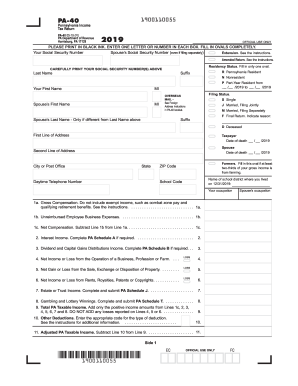
19 (FI) START ESTIMATED TAX PAID Name(s) 12. PA Tax Liability. Multiply Line 11 by 3.07 percent (0.0307). . . . . . . . . . . . . . . . . . . . . . 12. 13. Total PA Tax Withheld. See the instructions. . . . . . . . . . . . . . . . . . . . . . . . . . . . . . . . . . . 13. 14. Credit from your 2018 PA Income Tax return. . . . . . . . . . . . . . . . . . . . . . . . . . . . . . . . . . 14. 15. 2019 Estimated Installment Payments. Fill in oval if including Form REV-459B.

How it works

  1. Open form

    Open form follow the instructions

  2. Easily sign form

    Easily sign the form with your finger

  3. Share form

    Send filled & signed form or save

How to fill out the PA DoR PA-40 online

Filling out the Pennsylvania Income Tax Return PA-40 form online is an essential step for individuals and couples to ensure accurate tax reporting. This guide provides a clear and comprehensive walkthrough of the form's components, helping users successfully complete their online tax return.

Follow the steps to fill out the PA DoR PA-40 online.

  1. Press the ‘Get Form’ button to access the PA DoR PA-40 form and open it in the appropriate editor.
  2. Carefully print your Social Security number(s) in the designated fields at the top of the form. Ensure accuracy as this information is crucial for processing your return.
  3. Indicate your residency status by filling in the appropriate oval for 'Pennsylvania Resident,' 'Nonresident,' or 'Part-Year Resident.'
  4. Select your filing status by checking the correct oval for options such as 'Single,' 'Married, Filing Jointly,' or 'Married, Filing Separately.' If applicable, indicate if you are filing a final return.
  5. Complete the address section accurately, including your name, any suffixes, and your daytime telephone number.
  6. Proceed to report your income in the designated fields. Start with gross compensation and continue by completing lines for various types of income, such as interest, dividends, and business income.
  7. Calculate your total PA Taxable Income by adding the positive income amounts reported. Do not include any losses.
  8. Complete the deductions section by entering any applicable deductions based on your financial situation.
  9. Calculate your tax liability using the given percentage based on your adjusted taxable income.
  10. Fill in any credits, including tax withheld and estimated payments, ensuring to total them correctly.
  11. At the end of the form, review your entries and ensure all sections are complete. You can then save your changes, download a copy of the form, print it for your records, or share it as needed.

Take the first step towards completing your PA DoR PA-40 by filling out your tax return online today.

Get form

Experience a faster way to fill out and sign forms on the web. Access the most extensive library of templates available.

Related content

Forms and Publications | Department of Revenue
2024 Pennsylvania Income Tax Return (PA-40). Document ID: PA-40 ... PA Schedule G-L...
Learn more
Income Tax Forms - 2025 (for Tax Year 2024):...
Apr 2, 2025 — PA-40 Pennsylvania Income Tax Return. Instructions for PA-40 Personal...
Learn more
Walk-In Temp / Door /Alarm / Light Module
With LHt=0 the light remains on until the light button is pushed again. The light is...
Learn more

Related links form

MI Courts Form JC 06 2021 MI TE 4131 2018 CA FINRC-BL-RTL-nc - Berkeley City 2020 Canada PPTC 192 Form 2021

Questions & Answers

Get answers to your most pressing questions about US Legal Forms API.

Contact support

Yes, it is necessary to attach your W-2 forms when submitting your PA DoR PA-40 state tax return. This documentation allows the Pennsylvania Department of Revenue to review your earnings accurately. By providing all required attachments, you can help ensure that your state tax return is processed without delays. If you have any questions, our platform offers resources to assist you in gathering the necessary documentation.

Yes, if you are filing a federal return using Form 1040, you need to attach your W-2 forms that report your income. This requirement helps the IRS verify your earnings and prevents discrepancies. Remember, while the W-2 is crucial for both federal and state filings, the PA DoR PA-40 will also require its inclusion separately. Keep thorough records to ensure smooth processing of both tax returns.

The PA-40 form is the primary tax return document for Pennsylvania taxpayers, used to report income and calculate state tax liability. It is essential for residents and non-residents earning income in Pennsylvania. Completing the PA DoR PA-40 accurately ensures that you comply with state tax requirements while allowing for potential deductions. Using our platform can simplify this process by guiding you through the necessary steps.

PA withholding refers to the amount deducted from your paycheck to cover Pennsylvania state income tax. This amount varies based on your income level and tax situation. Understanding your withholding helps you manage your finances and avoid surprises during tax season. The PA DoR PA-40 form includes lines for reporting your withheld income, making it easier to reconcile any disparities.

When submitting your PA DoR PA-40, you need to attach your W-2 forms and any other relevant income documents. If you claim specific deductions or credits, also include supporting documentation for those claims. Providing accurate and complete information ensures that your tax return is processed efficiently. If you're unsure, consider using our platform for guidance on necessary attachments.

Yes, you should attach your W-2 forms to your PA DoR PA-40 tax return if you received income from an employer. This step provides the Pennsylvania Department of Revenue with essential information about your earnings. It is crucial for accurately calculating your state tax liability and ensuring compliance with state tax laws. Always keep a copy for your personal records as well.

When filing the PA DoR PA-40, you do not need to attach your federal return. However, it is important to maintain copies of all relevant federal documents for your records. This filing process ensures that your state taxes align correctly with your reported federal income. It simplifies your state tax filing while keeping your records in order.

To fill out a W-2 correctly, start by entering your employer’s information and the employee’s information in the designated boxes. Ensure that all amounts reported, such as wages, tips, and taxes withheld, are accurate. It is crucial that you double-check this information to avoid errors that could impact your PA DoR PA-40 filing. Accuracy will not only ensure compliance but also help you maximize any potential tax benefits.

To fill out the PA W-2 Reconciliation Worksheet, begin by gathering all of your W-2 forms. Enter your total Pennsylvania wages and state tax withheld from each W-2 on the respective lines of the worksheet. This will help you ensure your figures for the PA DoR PA-40 are accurate. After completing the worksheet, review for any discrepancies before filing.

2 reconciliation involves reviewing all 2 forms you received to ensure the reported income and taxes align with your own records. This process is crucial when preparing the PA DoR PA40, as discrepancies could lead to issues with your tax return. By performing 2 reconciliation, you verify that the withholding amounts are accurate and that your income is correctly reported.

Get This Form Now!

Use professional pre-built templates to fill in and sign documents online faster. Get access to thousands of forms.
If you believe that this page should be taken down, please follow our DMCA take down processhere.
Get PA DoR PA-40
  • Adoption
  • Bankruptcy
  • Contractors
  • Divorce
  • Home Sales
  • Employment
  • Identity Theft
  • Incorporation
  • Landlord Tenant
  • Living Trust
  • Name Change
  • Personal Planning
  • Small Business
  • Wills & Estates
  • Packages A-Z
  • Affidavits
  • Bankruptcy
  • Bill of Sale
  • Corporate - LLC
  • Divorce
  • Employment
  • Identity Theft
  • Internet Technology
  • Landlord Tenant
  • Living Wills
  • Name Change
  • Power of Attorney
  • Real Estate
  • Small Estates
  • Wills
  • All Forms
  • Forms A-Z
  • Other Templates
  • Legal Hub
  • About Us
  • Help Portal
  • Legal Resources
  • Blog
  • Affiliates
  • Contact Us
  • Delete My Account
  • Site Map
  • Industries
  • Forms in Spanish
  • Localized Forms
  • State-specific Forms
  • Forms Kit
  • Real Estate Handbook
  • All Guides
  • Notarize
  • Incorporation services
  • For Consumers
  • For Small Business
  • For Attorneys
  • USLegal
  • FormsPass
  • pdfFiller
  • signNow
  • altaFlow
  • DocHub
  • Instapage
Form Packages
  • Adoption
  • Bankruptcy
  • Contractors
  • Divorce
  • Home Sales
  • Employment
  • Identity Theft
  • Incorporation
  • Landlord Tenant
  • Living Trust
  • Name Change
  • Personal Planning
  • Small Business
  • Wills & Estates
  • Packages A-Z
Form Categories
  • Affidavits
  • Bankruptcy
  • Bill of Sale
  • Corporate - LLC
  • Divorce
  • Employment
  • Identity Theft
  • Internet Technology
  • Landlord Tenant
  • Living Wills
  • Name Change
  • Power of Attorney
  • Real Estate
  • Small Estates
  • Wills
  • All Forms
  • Forms A-Z
  • Other Templates
Customer Service
  • Legal Hub
  • About Us
  • Help Portal
  • Legal Resources
  • Blog
  • Affiliates
  • Contact Us
  • Delete My Account
  • Site Map
  • Industries
  • Forms in Spanish
  • Localized Forms
  • State-specific Forms
  • Forms Kit
Legal Guides
  • Real Estate Handbook
  • All Guides
Prepared for you
  • Notarize
  • Incorporation services
Our Customers
  • For Consumers
  • For Small Business
  • For Attorneys
Our Sites
  • USLegal
  • FormsPass
  • pdfFiller
  • signNow
  • altaFlow
  • DocHub
  • Instapage
Social Media
Call us now toll free:
+1 833 426 79 33
As seen in:
© Copyright 1999-2026 airSlate Legal Forms, Inc. 17 Station Street, Ste. 203, Brookline, MA 02445
  • Your Privacy Choices
  • Terms of Service
  • Privacy Notice
  • Content Takedown Policy
  • Bug Bounty Program
PA DoR PA-40
This form is available in several versions.
Select the version you need from the drop-down list below.
2022 PA DoR PA-40
Select form
  • 2022 PA DoR PA-40
  • 2021 PA DoR PA-40
  • 2020 PA DoR PA-40
  • 2019 PA DoR PA-40
  • 2018 PA DoR PA-40
  • 2017 PA DoR PA-40
  • 2016 PA DoR PA-40
  • 2015 PA DoR PA-40
  • 2014 PA DoR PA-40
  • 2012 PA DoR PA-40
  • 2010 PA DoR PA-40
  • 2009 PA DoR PA-40
  • 2008 PA DoR PA-40
  • 2007 PA DoR PA-40
Select form