Loading
Form preview
  • US Legal Forms
  • Other Templates
  • Tax Forms
  • Alaska Tax Forms
  • Ak 0405-6325i 2019

Get Ak 0405-6325i 2019-2026

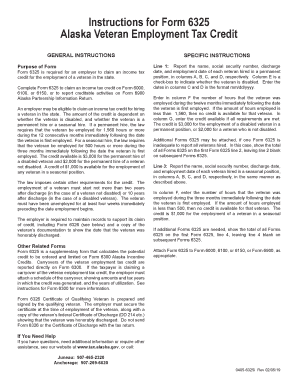
An in the state. Complete Form 6325 to claim an income tax credit on Form 6000, 6100, or 6150, or to report creditable activities on Form 6900 Alaska Partnership Information Return. An employer may be eligible to claim an income tax credit for hiring a veteran in the state. The amount of the credit is dependent on whether the veteran is disabled, and whether the veteran is a permanent hire or a seasonal hire. If a permanent hire, the law requires that the veteran be employed for 1,560 hours or m.

How it works

  1. Open form

    Open form follow the instructions

  2. Easily sign form

    Easily sign the form with your finger

  3. Share form

    Send filled & signed form or save

How to fill out the AK 0405-6325i online

The AK 0405-6325i is an important form for employers seeking to claim tax credits for hiring veterans in Alaska. This guide will provide a clear, step-by-step approach to completing the form online, ensuring that you understand each section and its requirements.

Follow the steps to successfully complete the AK 0405-6325i online.

  1. Press the ‘Get Form’ button to obtain the AK 0405-6325i and open it in the form editor.
  2. Begin filling out the form by entering the name, social security number, discharge date, and employment date for each veteran hired in permanent positions in columns A, B, C, and D, respectively. Remember to enter the dates in the mm/dd/yyyy format.
  3. In column E, check the box to indicate whether the veteran is disabled. Then, in column F, enter the number of hours that the veteran was employed during the twelve months following their employment start date. If this number is less than 1,560, no credit is available for that veteran.
  4. In column G, input the credit amount available, which is $3,000 for a disabled veteran and $2,000 for a non-disabled veteran.
  5. If needed, attach additional Forms 6325 for reporting more veterans. Indicate the total on line 2 of the first Form 6325 and leave line 2 blank on subsequent forms.
  6. Next, report the details for seasonal hires in line 3, repeating the same information entry process as for permanent hires.
  7. Enter the number of hours worked by seasonal hires in column F, ensuring this number is at least 500 to qualify for the $1,000 credit.
  8. Similarly, if you are submitting multiple Forms 6325, show the total on line 4 of the first form, leaving line 4 blank on the others.
  9. Finally, attach the completed Form 6325 to Form 6000, 6100, or 6150, or Form 6900, as appropriate. Review all entries for accuracy.
  10. Once you have reviewed and completed the form, be sure to save your changes, download, print, or share the form as needed.

Complete your forms online today to take advantage of the available tax credits for hiring veterans.

Get form

Experience a faster way to fill out and sign forms on the web. Access the most extensive library of templates available.
Get form

Related content

usteledirec00937_djvu.txt - Loc - Library of...
... 0405 Ames Thaddeus H 6301N52PI ---WHitny 5-8109 Ames Winthrop P ... A K 31ECarter...
Learn more
OCR of the Document | National Security Archive
OCR of the Document · Urban-Industrial Target List for Part I - from Abdulino (Russia) to...
Learn more

Related links form

ID EFO00104 2014 AZ DES UC-522-FF 2018 IA DoR 41-123a 2019 MO MO-ATC 2018

Questions & Answers

Get answers to your most pressing questions about US Legal Forms API.

Contact support

The IRS extension applies to corporations just as it does to individual taxpayers. By filing for this extension, corporations can receive additional time to prepare their tax returns. However, it's essential to check state requirements, as some states have different rules. For thorough guidance on managing extensions and filings, uslegalforms is a helpful ally.

Yes, Alaska does accept federal extensions for individual taxpayers and corporations alike. However, there are specific forms to complete, and deadlines must be adhered to. This acceptance allows for some flexibility in your tax filing, making it easier to manage. To navigate these processes, uslegalforms can provide the necessary tools and support.

Certain states do not accept federal extensions, including Arkansas and California, among others. In these states, businesses must be proactive and file their state taxes on time, regardless of federal extensions. It's vital to remain informed about state-specific regulations to avoid potential issues. For a comprehensive overview, check resources from uslegalforms that detail state requirements.

Yes, Alaska accepts federal extensions for corporations, allowing you to benefit from the time granted by the IRS. This additional time can ease the stress of gathering your financial documents. Remember to file your state-specific extension application to ensure compliance. For precise instructions, uslegalforms is a great resource.

In Alaska, the corporation income tax return form is the Form 6000, also known as the Alaska Corporate Income Tax Return. You need to complete this form if you are operating a corporation in the state. It’s important to be thorough and accurate in your submission to avoid penalties. Utilizing uslegalforms can assist you in correctly filling out and submitting your forms.

The corporate income tax in Alaska is structured based on the corporation's income levels. For profits exceeding a certain threshold, the tax rate increases incrementally. This structure allows businesses to contribute fairly to state revenues. If you are looking for specific details on how this affects your corporation, uslegalforms can provide valuable guidance.

Colorado does indeed accept federal extensions for corporations. This means that if you apply for an extension with the IRS, you can carry that extension over to your state tax obligations. It’s essential to ensure that you submit your state extension form within the designated timeline. For further assistance, consider the resources available through uslegalforms, which can help streamline your filing process.

1 appears on your tax return in the income section, specifically under the areas detailing income from partnerships, S corporations, or trusts. Each category on the K1 aligns with specific lines on the IRS Form 1040. If you're unsure, AK 04056325i will guide you through placing it correctly on your return. Correct placement ensures accurate tax calculations.

To submit a corrected K-1 to the IRS, obtain a corrected version of the K-1 from the issuer, and include it with your amended tax return. You will need to file Form 1040X to correct your original return. The AK 0405-6325i tool may provide insights on how to properly amend your tax documents. Make sure to keep copies for your records.

Reporting a K-1 on your taxes involves including the relevant information from the K-1 form onto your main tax return. This includes various sources of income and deductions as indicated on the K-1. You might find it helpful to use the AK 0405-6325i resources to assist you with this task. Clear documentation will facilitate a smooth filing experience.

Get This Form Now!

Use professional pre-built templates to fill in and sign documents online faster. Get access to thousands of forms.
Get form
If you believe that this page should be taken down, please follow our DMCA take down processhere.
Get AK 0405-6325i
Get form
  • Adoption
  • Bankruptcy
  • Contractors
  • Divorce
  • Home Sales
  • Employment
  • Identity Theft
  • Incorporation
  • Landlord Tenant
  • Living Trust
  • Name Change
  • Personal Planning
  • Small Business
  • Wills & Estates
  • Packages A-Z
  • Affidavits
  • Bankruptcy
  • Bill of Sale
  • Corporate - LLC
  • Divorce
  • Employment
  • Identity Theft
  • Internet Technology
  • Landlord Tenant
  • Living Wills
  • Name Change
  • Power of Attorney
  • Real Estate
  • Small Estates
  • Wills
  • All Forms
  • Forms A-Z
  • Other Templates
  • Legal Hub
  • About Us
  • Help Portal
  • Legal Resources
  • Blog
  • Affiliates
  • Contact Us
  • Delete My Account
  • Site Map
  • Industries
  • Forms in Spanish
  • Localized Forms
  • State-specific Forms
  • Forms Kit
  • Real Estate Handbook
  • All Guides
  • Notarize
  • Incorporation services
  • For Consumers
  • For Small Business
  • For Attorneys
  • USLegal
  • FormsPass
  • pdfFiller
  • signNow
  • altaFlow
  • DocHub
  • Instapage
Form Packages
  • Adoption
  • Bankruptcy
  • Contractors
  • Divorce
  • Home Sales
  • Employment
  • Identity Theft
  • Incorporation
  • Landlord Tenant
  • Living Trust
  • Name Change
  • Personal Planning
  • Small Business
  • Wills & Estates
  • Packages A-Z
Form Categories
  • Affidavits
  • Bankruptcy
  • Bill of Sale
  • Corporate - LLC
  • Divorce
  • Employment
  • Identity Theft
  • Internet Technology
  • Landlord Tenant
  • Living Wills
  • Name Change
  • Power of Attorney
  • Real Estate
  • Small Estates
  • Wills
  • All Forms
  • Forms A-Z
  • Other Templates
Customer Service
  • Legal Hub
  • About Us
  • Help Portal
  • Legal Resources
  • Blog
  • Affiliates
  • Contact Us
  • Delete My Account
  • Site Map
  • Industries
  • Forms in Spanish
  • Localized Forms
  • State-specific Forms
  • Forms Kit
Legal Guides
  • Real Estate Handbook
  • All Guides
Prepared for you
  • Notarize
  • Incorporation services
Our Customers
  • For Consumers
  • For Small Business
  • For Attorneys
Our Sites
  • USLegal
  • FormsPass
  • pdfFiller
  • signNow
  • altaFlow
  • DocHub
  • Instapage
Social Media
Call us now toll free:
+1 833 426 79 33
As seen in:
© Copyright 1999-2026 airSlate Legal Forms, Inc. 17 Station Street, Ste. 203, Brookline, MA 02445
  • Your Privacy Choices
  • Terms of Service
  • Privacy Notice
  • Content Takedown Policy
  • Bug Bounty Program