Loading
Get Mn Dor M1 2011
How it works
-

Open form follow the instructions
-

Easily sign the form with your finger
-

Send filled & signed form or save
How to fill out the MN DoR M1 online
Completing the MN DoR M1 form is essential for filing your individual income tax return in Minnesota. This guide will help you navigate through each section of the form, providing clear and supportive instructions for filling it out online.
Follow the steps to successfully complete the MN DoR M1 form online.
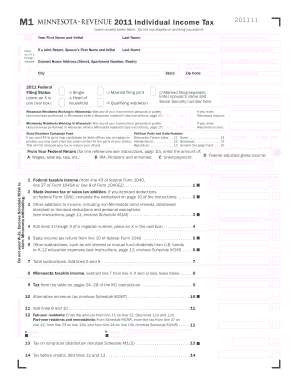
- Press the ‘Get Form’ button to access the MN DoR M1 form and open it in the online editor.
- Begin by providing your social security number in the designated field. If you are filing jointly, include your spouse’s first name, initial, and social security number as well.
- Fill out your current home address, including the street, apartment number (if applicable), city, state (WI or MN), and zip code.
- Enter your and your spouse’s date of birth in the format mm/dd/yyyy.
- Select your federal filing status by marking an X in the appropriate oval box—single, married filing jointly, married filing separately, head of household, or qualifying widow(er).
- Respond to whether you earned income while working as a resident of another state, specifically if any income was from services performed in Minnesota or Wisconsin. If yes, enter the respective income amounts.
- If you wish to contribute to the State Elections Campaign Fund, choose the political party code number that corresponds to your preference. This will not affect your tax amount or refund.
- Complete the income sections by entering the amounts from your federal return, including wages, pensions, and unemployment benefits. Do not send in W-2s; include Schedule M1W for Minnesota withholding.
- Calculate your Minnesota taxable income by following the instructions for adding any necessary lines. Ensure to subtract allowable deductions.
- After calculating the necessary fields, determine your total payments and any refundable or outstanding amounts. Ensure the accuracy of your entries.
- Finally, review your form, save the changes, and options to download, print, or share your completed MN DoR M1 form.
Complete your MN DoR M1 form online today for a seamless filing experience.
Get form
Experience a faster way to fill out and sign forms on the web. Access the most extensive library of templates available.
Nonresidents must file a Minnesota tax return if they have Minnesota-sourced income. This includes income from services performed in the state or rental income from Minnesota properties. Using the MN DoR M1 form will help ensure you correctly report your income and comply with state tax regulations.
Get This Form Now!
Use professional pre-built templates to fill in and sign documents online faster. Get access to thousands of forms.