Loading
Get Mo Rd-109 - Kansas City 2022-2026
How it works
-

Open form follow the instructions
-

Easily sign the form with your finger
-

Send filled & signed form or save
How to fill out the MO RD-109 - Kansas City online
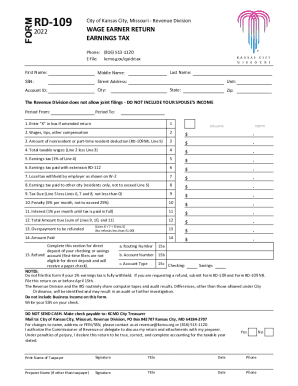
The MO RD-109 is the Wage Earner Return for Earnings Tax required by the City of Kansas City, Missouri. This guide will provide you with step-by-step instructions to complete the form online effectively, ensuring you meet your tax obligations accurately and efficiently.
Follow the steps to complete the MO RD-109 online.
- Press the ‘Get Form’ button to obtain the form and open it in your preferred editor.
- Begin filling out the form by providing your first name, middle name, last name, and social security number.
- Enter your street address, unit number (if applicable), city, state, and zip code.
- Input your Account ID in the designated field.
- Specify the period for which you are filing by entering the start date in the 'Period From' field and the end date in the 'Period To' field.
- If you are submitting an amended return, place an 'X' in the corresponding box in Line 1.
- For Line 2, enter the total amount of your wages, tips, and other compensation. Be sure to attach copies of all W-2s and 1099s.
- If you are a nonresident or part-time resident, complete Line 3 by entering the amount eligible for deduction from Line 5 of Form RD-109NR.
- Calculate your total taxable wages by subtracting the amount from Line 3 from Line 2 and enter it on Line 4.
- On Line 5, calculate your earnings tax by multiplying the total taxable wages in Line 4 by 1%.
- Enter the amount of any tax paid with your extension on Line 6.
- On Line 7, indicate the amount of local tax withheld by your employer.
- If applicable, enter any tax paid to another city on Line 8.
- Determine the tax due by subtracting Lines 6, 7, and 8 from Line 5, entering the result in Line 9.
- If the amount on Line 9 is overdue, add any penalties or interest on Lines 10 and 11 as applicable.
- Total all amounts on Line 12.
- If you have overpaid, calculate the refund amount for Line 13.
- Indicate the final payment amount on Line 14.
- For direct deposit, fill out Line 15 with your routing number, account number, and indicate the account type.
- Finally, ensure you sign and date the form before submission. Make sure to not send cash.
Complete your tax form online to ensure accurate filing and timely processing of your return.