Loading
Get Pa Birt 2021-2026
How it works
-

Open form follow the instructions
-

Easily sign the form with your finger
-

Send filled & signed form or save
How to fill out the PA BIRT online
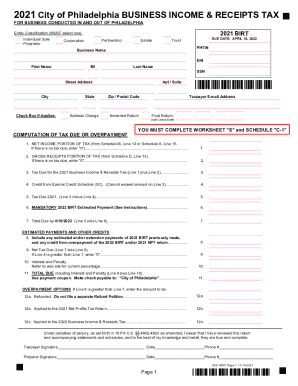
The Pennsylvania Business Income & Receipts Tax (BIRT) is a crucial document for businesses operating in Philadelphia. This guide provides step-by-step instructions on how to accurately complete the PA BIRT online, ensuring you meet all necessary requirements.
Follow the steps to successfully complete the PA BIRT online.
- Click ‘Get Form’ button to obtain the form and open it in the editor.
- Select the appropriate entity classification. You must choose one from the options provided, such as individual/sole proprietor, partnership, corporation, estate, or trust.
- Enter your business information, including your Business Name, PHTIN, EIN, and contact details like your email address and physical address.
- Indicate any applicable checkboxes, such as address change or amended return as needed.
- Complete the computation of tax due or overpayment by filling in the necessary amounts from the corresponding schedules. This includes net income and gross receipts from Schedule A or B.
- Calculate any credits and estimated payments, ensuring that all numbers are accurate and reflect your business's financial situation.
- Review the computation of tax due for the current year, including total due, interest, and penalties, if applicable.
- If you have an overpayment, fill out the relevant sections to indicate whether it will be refunded or applied to future tax obligations.
- Complete the signature section, ensuring that both the taxpayer and preparer, if applicable, sign and date the form.
- Once all sections are filled out correctly, save the changes, and choose an option to download, print, or share the form.
Start filling out the PA BIRT online today to ensure compliance and avoid any penalties.
Pennsylvania has a flat tax rate of 3.07% on individual income, with no personal exemptions.