Loading
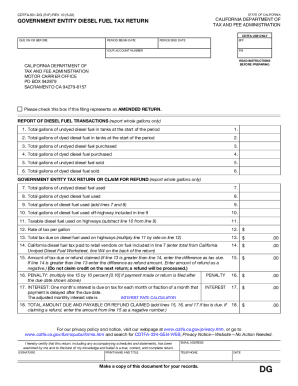
Get Ca Cdtfa-501-dg (formerly Boe-501-dg) 2022-2026
How it works
-

Open form follow the instructions
-

Easily sign the form with your finger
-

Send filled & signed form or save
How to fill out the CA CDTFA-501-DG (formerly BOE-501-DG) online
The CA CDTFA-501-DG is an essential form for government entities to report diesel fuel tax transactions in California. This guide provides a step-by-step approach to completing the form online, ensuring accuracy and ease of submission.
Follow the steps to accurately complete the CA CDTFA-501-DG online.
- Click ‘Get Form’ button to obtain the form and open it in the designated editor.
- Provide the period begin date and end date for the tax reporting period. This is the timeframe during which the diesel fuel transactions occurred.
- Enter your account number in the designated field. This number uniquely identifies your account with the California Department of Tax and Fee Administration.
- If applicable, indicate if this return represents an amended return by checking the appropriate box.
- Report the total gallons of undyed diesel fuel in tanks at the start of the period (Line 1). Enter whole gallons only.
- Report the total gallons of dyed diesel fuel in tanks at the start of the period (Line 2). Enter whole gallons only.
- Document the total gallons of undyed diesel fuel purchased during the reporting period (Line 3). Enter whole gallons only.
- Document the total gallons of dyed diesel fuel purchased during the reporting period (Line 4). Enter whole gallons only.
- Indicate the total gallons of undyed diesel fuel sold (Line 5). Enter whole gallons only.
- Indicate the total gallons of dyed diesel fuel sold (Line 6). Enter whole gallons only.
- Report the total gallons of undyed diesel fuel used (Line 7). Enter whole gallons only.
- Report the total gallons of dyed diesel fuel used (Line 8). Enter whole gallons only.
- Calculate the total gallons of diesel fuel used by adding lines 7 and 8 (Line 9). Enter whole gallons only.
- Report the total gallons of diesel fuel used off-highway (Line 10). This amount is included in line 9.
- Calculate the taxable diesel fuel used on highways by subtracting line 10 from line 9 (Line 11).
- Enter the rate of tax per gallon for the current reporting period (Line 12).
- Calculate the total tax due on diesel fuel used on highways by multiplying line 11 by the rate on line 12 (Line 13).
- Report the total California diesel fuel tax paid to retail vendors on the diesel fuel used for line 7 (Line 14). Enter this amount as instructed.
- Determine the amount of tax due or refund claimed (Line 15) based on the comparison of lines 13 and 14. Enter the difference appropriately.
- Calculate any penalties incurred for late filing (Line 16) if applicable.
- Calculate any interest due for late payments (Line 17) as specified.
- Sum lines 15, 16, and 17 to determine the total amount due or refund claimed (Line 18).
- Sign and print your name and title, enter your email address and phone number, and include the date.
- Finally, save your changes, or download, print, or share the completed form as required.
Ready to complete your CA CDTFA-501-DG form online? Start now!
Seller's Permit or "Sales Tax" License Some states may call this permit a sales tax permit or license. ... Although most businesses with a resale certificate have a seller's permit, some manufacturers never sell a product for resale and only provide components for other products.