Loading
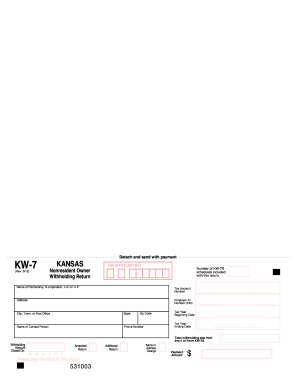
Get Ks Dor Kw-7 & Kw-7s 2012-2026
How it works
-

Open form follow the instructions
-

Easily sign the form with your finger
-

Send filled & signed form or save
How to fill out the KS DoR KW-7 & KW-7S online
The KS DoR KW-7 and KW-7S forms are essential for reporting nonresident owner withholding in Kansas. This guide will walk you through each section of these forms to ensure accurate completion and submission online.
Follow the steps to complete and submit your forms online with confidence.
- Press the ‘Get Form’ button to acquire the KW-7 and KW-7S documents and open them in the designated editor.
- Begin by entering the name of the partnership, S corporation, LLC, or LLP at the top of Form KW-7. Input the relevant tax account number, employer ID number, and the full address details, including city, state, and zip code.
- Indicate the name of the contact person and their phone number for follow-up inquiries.
- Fill in the tax year information by entering the beginning and ending dates.
- On Line 4 of Form KW-7S, provide the total withholding amount calculated from Line 4 based on the information gathered in the previous steps.
- If there are amendments, check the appropriate box to indicate this, and ensure that the forms are signed where indicated.
- If additional nonresident owners are needed beyond the first page, utilize extra copies of Form KW-7S as necessary.
- Upon completion, save your changes. You can then download, print, or share the filled-out forms for submission.
Complete your KS DoR KW-7 & KW-7S forms online for efficient and accurate processing.
Yes, Kansas does maintain a state withholding tax system that requires employers to withhold a portion of employees' wages for state income tax. This withholding is an essential aspect of compliance with Kansas tax laws. Understanding how state withholding works can help you better manage your financial responsibilities. The KS DoR KW-7 & KW-7S forms are key resources in navigating these requirements.