Loading
Get Irs 5498-esa 2021
This website is not affiliated with IRS
How it works
-

Open form follow the instructions
-

Easily sign the form with your finger
-

Send filled & signed form or save
How to fill out the IRS 5498-ESA online
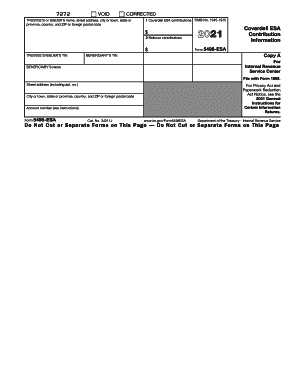
Filling out the IRS 5498-ESA form online is essential for reporting contributions to a Coverdell education savings account. This guide provides a step-by-step approach to ensure accurate completion of the form, tailored for users of all experience levels.
Follow the steps to successfully complete the form
- Click ‘Get Form’ button to access the IRS 5498-ESA form and open it in the online editor.
- Fill out the trustee’s or issuer’s name, street address, city or town, state or province, country, and ZIP or foreign postal code in the designated fields.
- Enter the year for the reporting period, which is 2021 for this form.
- In Box 1, input the total contributions made to the Coverdell ESA during the reporting year. Do not deduct these amounts on your income tax return.
- In Box 2, record any rollover contributions made in 2021. Ensure that any rollover from one Coverdell ESA to another is properly documented.
- Provide the beneficiary’s taxpayer identification number and name in the specified fields.
- Complete the beneficiary’s street address, city or town, state or province, country, and ZIP or foreign postal code.
- Enter the account number if applicable, which distinguishes the beneficiary’s account.
- Review all entries for accuracy before finalizing the form.
- Once completed, save changes, download, print, or share the form as needed.
Complete your IRS 5498-ESA form online today for accurate reporting!
Get form
Experience a faster way to fill out and sign forms on the web. Access the most extensive library of templates available.
Related links form
Get This Form Now!
Use professional pre-built templates to fill in and sign documents online faster. Get access to thousands of forms.