Loading
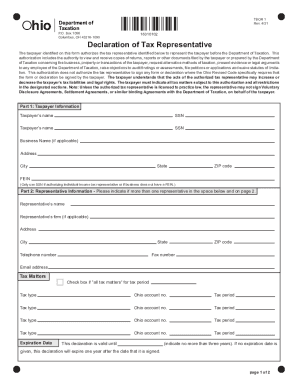
Get Oh Tbor 1 2021-2026
How it works
-

Open form follow the instructions
-

Easily sign the form with your finger
-

Send filled & signed form or save
How to fill out the OH TBOR 1 online
Completing the OH TBOR 1 form online is a straightforward process that allows a taxpayer to authorize a representative. This guide will provide step-by-step instructions to ensure users fill out the form correctly and efficiently.
Follow the steps to complete the OH TBOR 1 form online.
- Click ‘Get Form’ button to download the OH TBOR 1 form and open it in an online editor.
- Begin by filling in the 'Taxpayer Information' section. Enter the taxpayer’s name and Social Security Number (SSN). If applicable, include the business name, address, city, state, ZIP code, and Employer Identification Number (FEIN). Note that you should only use the SSN if authorizing an individual income tax representative or if the business lacks a FEIN.
- Proceed to the 'Representative Information' section. Enter the representative’s name and firm, if applicable. Provide the representative's address, city, state, telephone number, ZIP code, fax number, and email address. If there is more than one representative, ensure to denote this accordingly.
- In the 'Tax Matters' section, indicate if the authorization covers 'all tax matters' for the tax period by checking the appropriate box. For specific tax types, fill in the tax type description, Ohio account number, and tax period for each relevant tax matter.
- Set an expiration date for the declaration. This can be no more than three years from the date signed; if left blank, it will expire one year after signing.
- Fill out any 'Restrictions to this Declaration' as necessary. Ensure to provide any applicable restrictions that the taxpayer wants to implement.
- Under the 'Declaration of Representative' section, the representative must confirm their eligibility by checking the appropriate designation box and providing the required information, such as their signature, license number, and date.
- As the taxpayer (or authorized signatory), complete the signature section. Print your name, provide your title, telephone number, and email address. If filing jointly, include the spouse’s signature.
- Once all sections are completed, save the changes in the online editor. You can then download the filled form, print it, or share it as required.
Complete your OH TBOR 1 form online today to streamline your tax representation process.
Call the IRS: 1-800-829-1040 hours 7 AM 7 PM local time Monday-Friday. Press 1 for English. ... Press 1 For questions about a form you have already submitted or Press 3 For all other questions about your tax history or Press 2 For all other questions about your tax history or payment