Loading
Get Ia Dor 35-002 2013
How it works
-

Open form follow the instructions
-

Easily sign the form with your finger
-

Send filled & signed form or save
How to fill out the IA DoR 35-002 online
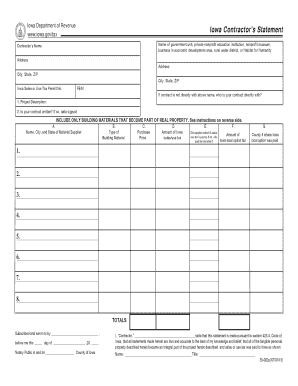
This guide provides step-by-step instructions on how to accurately complete the IA DoR 35-002 form online. Designed for contractors involved in various projects, this document ensures compliance with Iowa tax regulations while facilitating your submission process.
Follow the steps to successfully fill out the IA DoR 35-002 form.
- Press the ‘Get Form’ button to retrieve the IA DoR 35-002 form and open it for filling out.
- In the first section, input the name of the government unit or organization you are contracting with, followed by the contractor's name and address details, including city, state, and ZIP code.
- Provide the Iowa Sales or Use Tax Permit Number and the Federal Employer Identification Number (FEIN) if applicable.
- Indicate if your contract is directly with the entity named above, and if not, specify the name of the direct contracting party.
- In the Project Description field, provide a brief but comprehensive description of the project.
- State whether your contract is written, and if so, include the date it was signed.
- For the materials section, fill in the required columns (A through E) for each material that will become part of the real property. Include the name, city, and state of the material supplier.
- Specify the type and purchase price of each building material while ensuring no transportation or delivery charges are included.
- Calculate and enter the total Iowa sales/use tax for the materials listed and indicate whether the supplier collected this tax.
- If local option tax applies, complete any additional columns as required and provide the county number where the tax was paid.
- Review your entries for accuracy before finalizing. After completing the form, save your changes, and choose to download, print, or share the document as needed.
Complete your IA DoR 35-002 form online today to ensure compliance and facilitate your tax refund process.
Get form
Experience a faster way to fill out and sign forms on the web. Access the most extensive library of templates available.
Related links form
When rounding a number with a decimal point, the number to the right of the decimal determines whether you round up or down. To round to the nearest dollar, you would look at the number to the right of the decimal and determine whether that number is less than 5. If the number were 0 4, you would round down.
Get This Form Now!
Use professional pre-built templates to fill in and sign documents online faster. Get access to thousands of forms.