Loading
Get Me Rew-2 2021-2026
How it works
-

Open form follow the instructions
-

Easily sign the form with your finger
-

Send filled & signed form or save
How to fill out the ME REW-2 online
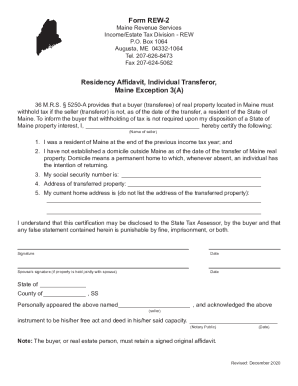
The ME REW-2 form, also known as the residency affidavit, is a crucial document for individuals transferring real property in Maine. This guide provides users with a step-by-step approach to completing the form accurately and efficiently online.
Follow the steps to successfully complete the ME REW-2 form
- Press the ‘Get Form’ button to access the ME REW-2 form and open it in your preferred editing platform.
- In the designated field, enter the name of the seller who is transferring the property as it appears on legal documents.
- Confirm your residency by indicating that you were a resident of Maine at the end of the previous income tax year.
- Affirm that you have not established a domicile outside Maine as of the date of the property transfer.
- Input your social security number in the specified field to identify yourself.
- Provide the address of the transferred property clearly to ensure accurate identification of the location.
- List your current home address in the appropriate section, ensuring it is not the same as the transferred property's address.
- Read the acknowledgment statement regarding the potential disclosure of this certification to the State Tax Assessor, and recognize the implications of false statements.
- Sign and date the form to confirm the accuracy of the information provided.
- If applicable, have your spouse sign and date the form to validate joint ownership of the transferred property.
- Complete the notary section by having a notary public witness your signature and acknowledge the execution of the document.
- Once all fields are completed accurately, you can save your changes, download the form, print it, or share it as necessary.
Get started on completing your ME REW-2 form online today!