Loading
Get Wv Schedule M It-140 2020
How it works
-

Open form follow the instructions
-

Easily sign the form with your finger
-

Send filled & signed form or save
How to fill out the WV Schedule M IT-140 online
Filling out the WV Schedule M IT-140 form online can seem daunting at first, but with clear guidance, you can navigate it successfully. This guide will provide you with step-by-step instructions to ensure you complete the form accurately and efficiently.
Follow the steps to fill out the WV Schedule M IT-140 online.
- Click ‘Get Form’ button to obtain the form and open it in your preferred digital environment.
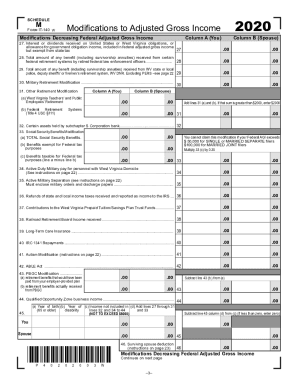
- Begin with Column A, which represents your information. Enter the amounts for each modification decreasing your federal adjusted gross income as specified in each line of the form. Start with line 27, which pertains to interest or dividends received on U.S. or West Virginia obligations. Ensure that you only include amounts that are exempt from state tax.
- Move to line 28, where you will input any benefits received from specific federal retirement systems. Continue this process through to line 46, filling in the corresponding amounts in both columns as applicable.
- At line 47, add together all the amounts you've entered in both Column A and Column B. This total will give you an overarching view of your modifications decreasing federal adjusted gross income.
- Transfer the total from line 48, which represents the combined subtractions from both columns, to line 3 of FORM IT-140.
- Proceed to modifications increasing federal adjusted gross income, starting at line 49. Input any interest or dividend income from federal obligations that is subject to state tax.
- Finally, after reviewing all entries for accuracy, you can save your changes, download, print, or share the completed document as necessary.
Complete your WV Schedule M IT-140 online to ensure your modifications are reported accurately and on time.
Get form
Experience a faster way to fill out and sign forms on the web. Access the most extensive library of templates available.
Related links form
Any entity that files Form 1065 must file Schedule M-3 (Form 1065) if any of the following is true: The amount of total assets at the end of the tax year reported on Schedule L, line 14, column (d), is equal to $10 million or more.
Get This Form Now!
Use professional pre-built templates to fill in and sign documents online faster. Get access to thousands of forms.