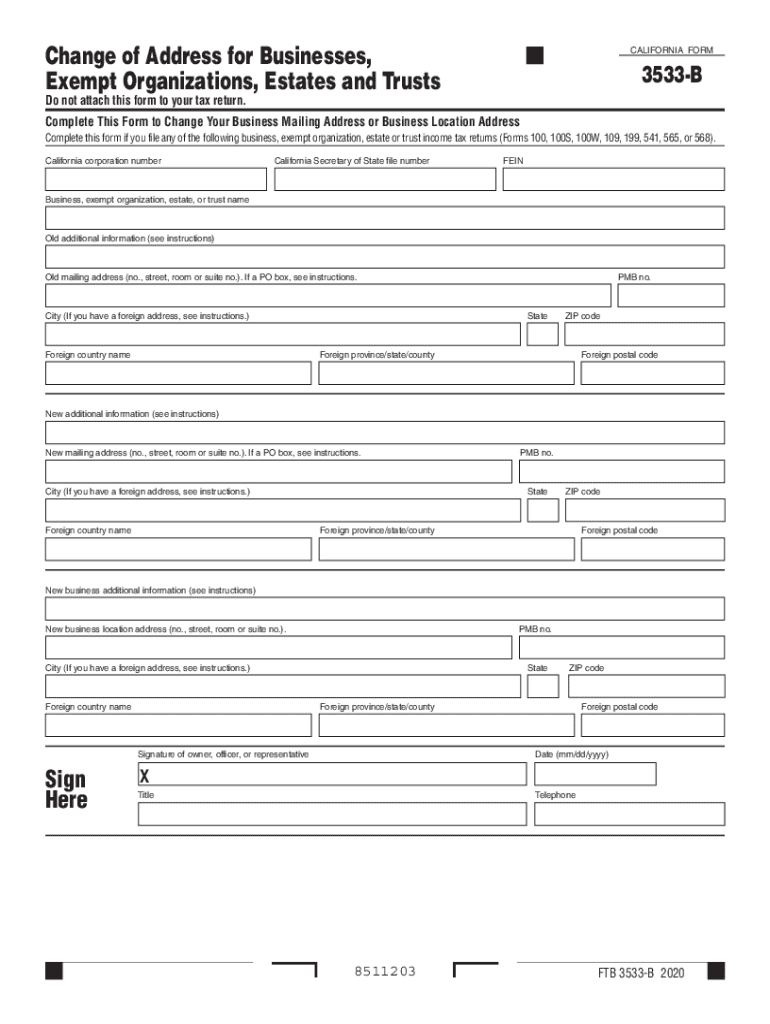
Change of Address for Businesses Exempt Organizations Estates and Trusts CALIFORNIA FORM 3533-B Complete This Form to Change Your Business Mailing Address or Business Location Address California corporation number California Secretary of State file number FEIN Business exempt organizations estate or trust name Old additional information see instructions Old mailing address no. street room or suite no. city or town state and ZIP code If a PO box see instructions. City If you have a foreign address see instructions. Foreign country name PMB no. State ZIP code Foreign province/state/county Foreign postal code New additional information see instructions New mailing address no. street room or suite no. city or town state and ZIP code If a PO box see instructions. New business additional information see instructions New business location address no. street room or suite no. city or town state and ZIP code Signature of owner officer or representative Sign Here Date mm/dd/yyyy X Title Telephon....
Loading

Open form follow the instructions

Easily sign the form with your finger

Send filled & signed form or save
How to fill out the CA FTB 3533-B online
The CA FTB 3533-B form allows users to change the mailing address or business location address for businesses, exempt organizations, estates, and trusts. This guide will provide clear and concise steps to help users complete the form online effectively.
Follow the steps to complete your CA FTB 3533-B form online.
- Click the ‘Get Form’ button to obtain the form and open it in the designated editor.
- Begin filling in the California corporation number, Secretary of State file number, and FEIN in the appropriate fields.
- Enter the name of your business, exempt organization, estate, or trust as it appears on official documents.
- Provide the old mailing address, including the building number, street address, and suite number if applicable. If you use a PO box, refer to the instructions for specific guidance.
- Complete the city field for the old address. If applicable, include the foreign country name.
- Fill in the state and ZIP code for the old address, as well as any foreign province, state, or county information and foreign postal code if necessary.
- Proceed to the new mailing address section and enter the updated address details in the same manner as the old address.
- For the new business location address, enter the building number, street, and suite number if applicable.
- Input the newly updated city, state, and ZIP code for the business location address. Include foreign information if required.
- Complete the signature section by having the owner, officer, or representative sign the form, insert the date, and indicate their title.
- Once all fields are filled out correctly, save your changes, and consider downloading, printing, or sharing the form as needed.
Complete your CA FTB 3533-B form online today for a seamless address change.
Experience a faster way to fill out and sign forms on the web. Access the most extensive library of templates available.
Related content
Jun 26, 2019 - Use form FTB 3533-B, Change of Address for Businesses, Exempt...
Nov 1, 2019 - 3533, Office of Technology, OIL & GAS FIELD MACHINERY & EQUIPMENT. 3537...
115 116 B. BASIC INSTRUCTION TESTS (BIT) 117 118 119 THIS SECTION CONSISTS ...... SHTTL...
Get answers to your most pressing questions about US Legal Forms API.
How do I change my address FTB?
Login to MyFTB. Select Profile from the tool bar. Choose Update contact information View your account information. Select the Edit address link and enter your new address. Select the Save button.
How do I change my address for taxes?
To change your address with the IRS, complete Form 8822, Address Change Request. If you want to inform the IRS of your change of address, they will need your full name, old and new addresses, and your Social Security Number or Employer Identification Number, and a signature.
How do I change my LLC address with the IRS?
Even if you update your address via your tax return, we've seen mail still getting sent to an old address. ... Using Form 8822-B creates a better paper trail. ... We feel Form 8822-B is the simplest method with the best results.
Can I put a different address on tax return?
In future, should you have an address change to report to the IRS, you can provide the IRS with your updated mailing address by mailing Form 8822, Change of Address to the IRS Service Center designated for your location.
Can I change my address with IRS online?
You can change your address with the IRS directly by completing IRS form 8822 b. ... If you are the responsible party for a business, you will need to use Form 8822-B to change your address. When using either of these forms, you will be asked to provide basic information, including your old address and your new address.
How do I do a change of address with the IRS?
To change your address with the IRS, you may complete a Form 8822, Change of Address, (For Individual, Gift, Estate, or Generation-Skipping Transfer Tax Returns) (PDF) and/or a Form 8822-B, Change of Address or Responsible Party Business (PDF) and send them to the address shown on the forms.
How do I change my business address in California?
Generally, complete only one form FTB 3533-B to change your business address. If you are a representative fling for the business, go to ftb.ca.gov and search for poa. You may also go to ftb.ca.gov and search for myftb account or call 800.852.5711 to change your address.
How do I change my business address with the secretary of state in Ohio?
File Form 524, the Name Registration Update form, with the Ohio secretary of state's office. Check off Box four, located at the top of the form, which says Cancellation of Registration.
How do I change my business address?
Go to USPS.com/move to change your address online. This is the fastest and easiest way, and you immediately get an email confirming the change. There is a $1 charge to change your address online. ... Go to your local post office and request a Mover's Guide packet. Inside the packet is PS Form 3575.
How do I change my business address with the Secretary of State?
You can change your LLC's address with the Internal Revenue Service by filing Form 8822-B, Change of Address or Responsible Party Business. Visit your state and local taxation department websites to find out how to change your business address in states and localities where you pay taxes.
Use professional pre-built templates to fill in and sign documents online faster. Get access to thousands of forms.
If you believe that this page should be taken down, please follow our DMCA take down process here.