Loading
Get Ak Dor 6150 2019
How it works
-

Open form follow the instructions
-

Easily sign the form with your finger
-

Send filled & signed form or save
How to fill out the AK DoR 6150 online
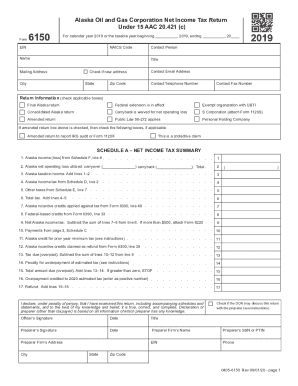
The AK DoR 6150 is the Alaska Oil and Gas Corporation Net Income Tax Return form used to report income and calculate taxes for entities operating in Alaska. This guide provides clear, step-by-step instructions to assist users in accurately completing the form online.
Follow the steps to successfully complete your AK DoR 6150 online.
- Click 'Get Form' button to obtain the AK DoR 6150 and open it in your editor.
- Enter your Employer Identification Number (EIN) in the designated field at the top of the form.
- Input the NAICS code that corresponds to your business operations.
- Fill in the contact person's name, title, and mailing address, including city, state, and zip code.
- Provide the contact email address and telephone number within the specified fields.
- Select applicable return information by checking the relevant boxes, such as whether this is a final return or an amended return.
- Complete Schedule A by filling in your Alaska income, net operating loss utilized, and calculating your Alaska taxable income.
- Proceed to complete other sections, including Schedule B for taxpayer information and Schedule C for tax payments.
- Ensure all additional schedules relevant to your situation are completed, such as Schedule D for tax computation and Schedule I for apportionment factors.
- Review all entries thoroughly to ensure accuracy, then save or submit your completed form. Options to download, print, or share the form will be available.
Start filling out your AK DoR 6150 online today for a smooth filing experience.
Get form
Experience a faster way to fill out and sign forms on the web. Access the most extensive library of templates available.
Get This Form Now!
Use professional pre-built templates to fill in and sign documents online faster. Get access to thousands of forms.