Loading
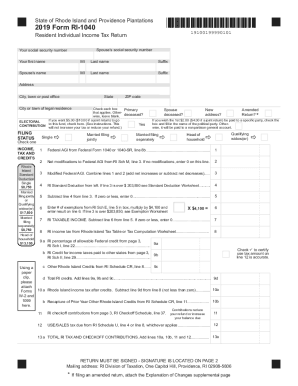
Get Ri Dot Ri-1040 2019
How it works
-

Open form follow the instructions
-

Easily sign the form with your finger
-

Send filled & signed form or save
How to fill out the RI DoT RI-1040 online
Filling out the Rhode Island Department of Taxation's RI-1040 form is an essential step for residents submitting their individual income tax returns. This guide will provide clear, step-by-step instructions to help you complete the form accurately and efficiently online.
Follow the steps to complete your RI DoT RI-1040 online
- Click ‘Get Form’ button to obtain the RI-1040 form and open it in the online editor.
- Fill in your personal information. Include your name, Social Security number, and address. Ensure to provide your spouse's details if filing jointly.
- Indicate your filing status by checking the appropriate box. Select from options such as Single, Married filing jointly, or Head of household, based on your situation.
- Enter your Federal Adjusted Gross Income (AGI) from your Federal Form 1040 on line 1. Make sure to follow any prompts regarding adjustments.
- Complete line 2 by inputting any modifications to your Federal AGI. If there are no modifications, enter 0.
- Calculate your Modified Federal AGI by adding or subtracting your modifications, and enter the result on line 3.
- Refer to line 4 for the Rhode Island Standard Deduction applicable to your filing status. Complete this section accordingly.
- Subtract line 4 (standard deduction) from line 3 (modified AGI) and enter the result on line 5. If this results in zero or a negative number, enter 0.
- Calculate the number of exemptions from your Exemption Schedule and multiply by $4,100. Enter this total on line 6.
- Subtract line 6 from line 5 to determine your Rhode Island taxable income, and enter the result on line 7.
- Use the Rhode Island Tax Table or Tax Computation Worksheet to determine your tax based on the taxable income, and enter this on line 8.
- List any allowable Rhode Island credits on lines 9a to 9c, and compute the total to enter on line 9d.
- Calculate your Rhode Island income tax after credits. This is done by subtracting the total credits (line 9d) from the tax amount on line 8.
- Follow through with the Payments and Property Tax Relief Credit section by entering any relevant withheld taxes, overpayments, or credits.
- Complete the final amount due or total overpayment section and ensure you sign the return on page 2.
- Once all sections are completed, save your changes, download if necessary, and choose to print or share the form as required.
Complete your RI DoT RI-1040 online today to ensure accurate and timely submission!
Get form
Experience a faster way to fill out and sign forms on the web. Access the most extensive library of templates available.
Connecticut Median Household Income If you are single or married and filing separately, the tax rate is 3% for those who make $10,000 or less in taxable income; 5% for up to $50,000; 5.5% for up to $100,000; 6% for up to $200,000; 6.5% for up to $250,000; 6.9% for up to $500,000 and 6.99% for over $500,000.
Get This Form Now!
Use professional pre-built templates to fill in and sign documents online faster. Get access to thousands of forms.