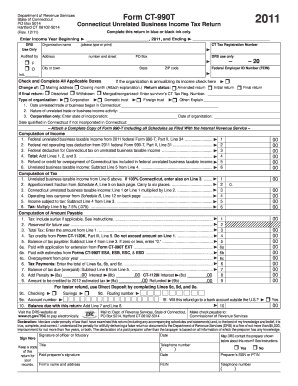
4 5. Income subject to tax: Subtract Line 4 from Line 3. ....................................................................................... 5 6. Tax: Multiply Line 5 by 7.5% (.075). ............................................................................................................... 6 Computation of Amount Payable 1. Tax: Include surtax if applicable. See instructions. .
Open form follow the instructions
Easily sign the form with your finger
Send filled & signed form or save
How to fill out the CT DRS CT-990T online
Filling out the CT DRS CT-990T online is essential for organizations reporting unrelated business income in Connecticut. This guide will provide you with a clear step-by-step process, making it easy to navigate each section of the form.
Follow the steps to complete the CT DRS CT-990T efficiently.
- Click the ‘Get Form’ button to access the CT DRS CT-990T and open it in your browser.
- Enter the income year, beginning and ending dates in the designated fields at the top of the form.
- Provide your organization’s name, CT Tax Registration Number, address, and Federal Employer ID Number (FEIN). Ensure you check and complete all applicable boxes regarding the return status.
- Complete the sections regarding the type of organization, including the start date of the unrelated trade, nature of the activity, and any applicable state of incorporation information.
- For the computation of income, fill in the lines for federal unrelated business taxable income, net operating loss deduction, and total amounts. Ensure accuracy when calculating each line.
- Proceed to the computation of tax section by entering your unrelated business taxable income, apportionment fraction, and calculating the final income subject to tax.
- In the computation of amount payable section, input all relevant tax figures and any applicable tax credits to determine the balance of tax due.
- Complete the direct deposit information for refunds if applicable and fill out the declaration section, including required signatures and contact details.
- Once all sections are filled in, ensure that you review the entire form for accuracy. Finally, you can save changes, download, print, or share the form as needed.
Start filling out your CT DRS CT-990T online today to ensure compliance and accuracy.
Experience a faster way to fill out and sign forms on the web. Access the most extensive library of templates available.
Related content
Connecticut State Department of Revenue Services ; Form Name, Description, Revised Date ;...
Nov 18, 2014 — 990, and 990·T (Section 501 (c)(3)s only) available for public...
Get answers to your most pressing questions about US Legal Forms API.
How do I get a sales tax certificate in CT?
To get a sales tax certificate in Connecticut, you must complete the application process through the CT Department of Revenue Services. This certificate is necessary for businesses to buy goods without paying sales tax. Referencing the CT DRS CT-990T can assist with any necessary tax filings.
How do I get an IRS tax clearance certificate?
To obtain an IRS tax clearance certificate, you need to submit Form 8821, which allows the IRS to release your tax information. After your request is processed, you'll receive your certificate, verifying your tax status. The CT DRS CT-990T can help track related state obligations.
What is a tax payment certificate?
A tax payment certificate is an official document that confirms your tax payments have been made to the state. This certificate can be crucial when doing business in Connecticut. For more insights on tax documentation, consult the CT DRS CT-990T.
Who provides a tax clearance certificate?
The tax clearance certificate is provided by the CT Department of Revenue Services. This document verifies that your tax payments are up to date. If you need assistance, using the CT DRS CT-990T for reference can help streamline your request.
How do I get my CT tax form?
To get your CT tax form, visit the CT Department of Revenue Services website where you can find downloadable forms. It's beneficial to review the CT DRS CT-990T to ensure you are using the correct tax form for your specific needs. This can help simplify the filing process.
How to get a CT sales tax number?
You can acquire a CT sales tax number by applying through the CT Department of Revenue Services. Completing the application correctly is crucial. Once you have your number, you can efficiently manage your sales tax responsibilities, making it easier to reference forms like the CT DRS CT-990T.
How do I get a tax clearance certificate in CT?
To obtain a tax clearance certificate in Connecticut, you must request it from the CT Department of Revenue Services. This certificate confirms that you have fulfilled your tax obligations. For guidance on the application process, you can refer to the CT DRS CT-990T as a resource.
What is the 7.35% tax in Connecticut?
The 7.35% tax in Connecticut refers to the state's sales tax rate applied to goods and services. Understanding this tax is essential for both individuals and businesses. If you're filing tax forms, you may need to reference the CT DRS CT-990T for details on tax payments and calculations.
Who do I write my CT state tax check to?
When writing a check for your Connecticut state taxes, make it payable to the Connecticut Department of Revenue Services. Ensure to include your tax identification number on the check for accurate processing. For guidance on payment methods, refer to the CT DRS CT-990T, which offers clear directions on handling your state tax payments.
How much is CT state withholding tax?
Connecticut state withholding tax varies based on your income bracket and applicable deductions. Generally, expect to see around 5% to 6.5% withheld from your paycheck. The CT DRS CT-990T provides a thorough overview to help you calculate your expected withholding accurately.
Use professional pre-built templates to fill in and sign documents online faster. Get access to thousands of forms.
If you believe that this page should be taken down, please follow our DMCA take down process here.
This form is available in several versions. Select the version you need from the drop-down list below.