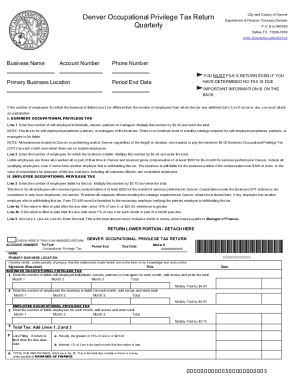
Get Co Denver Occupational Privilege Tax Return Quarterly
How it works
-

Open form follow the instructions
-

Easily sign the form with your finger
-

Send filled & signed form or save
How to fill out the CO Denver Occupational Privilege Tax Return Quarterly online
Completing the CO Denver Occupational Privilege Tax Return Quarterly online can be straightforward with the right guidance. This document is crucial for businesses operating in Denver to report their privilege tax obligations accurately and on time.
Follow the steps to fill out the form correctly online.
- Click ‘Get Form’ button to access the CO Denver Occupational Privilege Tax Return Quarterly and open it for editing.
- Enter your business name in the designated field. Ensure that the name is spelled correctly as it appears on official documents.
- Provide your account number. This is essential for identifying your business in the tax system.
- Fill in the primary business location. Clearly state the address where your business operates.
- Input your phone number for contact purposes. This helps in case there are any questions regarding your submission.
- Specify the period end date. This indicates the tax period for which you are filing.
- Report the number of self-employed individuals, owners, partners, or managers for each month in Line 1. Calculate the total and multiply by $4.00 to find your tax due.
- In Line 2, enter the number of liable employees for each month. Again, tally the totals and multiply by $4.00.
- In Line 3, document the number of employees who received compensation for the month. Calculate the total and multiply by $5.75.
- Combine the totals from Lines 1, 2, and 3 to get the Total Tax amount in Line 4.
- If your return is filed late, calculate additional penalties in Line 5a and Line 5b as instructed.
- If applicable, record any approved credit in Line 6, ensuring that any necessary documentation is attached.
- Add up Lines 4, 5a, 5b, and deduct Line 6 to find the total amount due in Line 7.
- Finally, review the form for accuracy. Once complete, you can save your changes, download a copy, print, or share the form accordingly.
Start completing your CO Denver Occupational Privilege Tax Return Quarterly online today!
Related links form
Yes, if you earn income from working or conducting business in Denver, you are typically required to file a Denver income tax return. This filing ensures you comply with local tax laws and helps you avoid potential penalties. For convenience, you might consider using the uslegalforms platform to simplify the preparation of your CO Denver Occupational Privilege Tax Return Quarterly alongside your income tax obligations.