Loading
Get Ak Ap-810 2014-2026
How it works
-

Open form follow the instructions
-

Easily sign the form with your finger
-

Send filled & signed form or save
How to fill out the AK AP-810 online
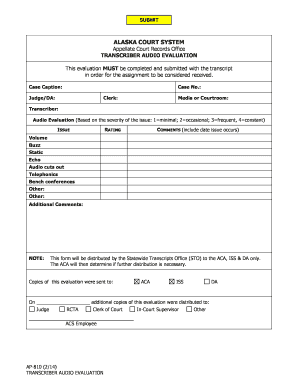
The AK AP-810 form is a critical document used in the Alaska Court System for evaluating audio transcripts. Properly completing this form ensures that your evaluation is received and processed correctly.
Follow the steps to fill out the AK AP-810 form with ease.
- Click ‘Get Form’ button to obtain the form and open it in your editor.
- Begin by entering the case caption in the designated field, ensuring clear identification of the case involved.
- Fill in the case number accurately to link your evaluation to the corresponding case file.
- Provide the name of the judge or District Attorney associated with this case in the appropriate section.
- Indicate the clerk involved in this matter, as this identifies who will be processing your submission.
- Specify the media type or courtroom location relevant to the audio being evaluated to give contextual details.
- Enter your name as the transcriber in the designated field to attribute the evaluation correctly.
- Evaluate the audio quality issues as instructed, rating from 1 to 4 for each specified issue, including comments about when these issues occurred.
- Provide any additional comments that may be relevant to your evaluation in the space provided.
- Once all fields are completed, review the form for accuracy and completeness before saving your changes.
- After finalizing the form, options will be available to download, print, or share the completed evaluation as necessary.
Complete your forms online today to ensure timely processing and evaluation.