Loading
Get Ct Jd-gc-23 2017
How it works
-

Open form follow the instructions
-

Easily sign the form with your finger
-

Send filled & signed form or save
How to fill out the CT JD-GC-23 online
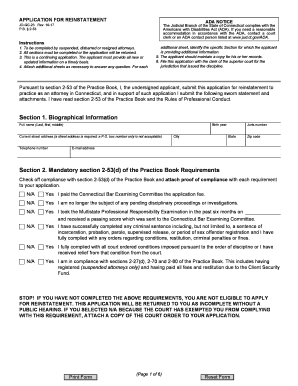
Filling out the CT JD-GC-23, the application for reinstatement, requires careful attention to detail and adherence to the specified guidelines. This guide provides clear, step-by-step instructions to assist users in completing the form accurately and efficiently.
Follow the steps to successfully complete the application
- Press the ‘Get Form’ button to obtain the form and open it in your chosen editor.
- Begin by completing Section 1, which includes your biographical information such as your full name, current address, telephone number, and email address. Ensure that you enter this information accurately to avoid delays in processing.
- In Section 2, check off each item indicating compliance with the requirements outlined in section 2-53(d) of the Practice Book. Attach proof where necessary, and be mindful that selecting 'N/A' without appropriate documentation may render your application incomplete.
- Proceed to Section 3 and provide a chronological list of your residence history since your suspension, disbarment, or resignation. Ensure to include all occurrences lasting more than thirty days.
- In Section 4, answer questions related to your licensing status and any previous applications for reinstatement. Attach documents as required for any past disciplinary actions.
- Section 5 requires you to detail your employment history during the same period. List each job chronologically, including the name of the employer, your position, and the reasons for leaving.
- Complete Section 6 by addressing any civil and family proceedings you have been involved in since your last status change. Provide necessary documentation for any judgments.
- In Section 7, answer questions regarding any criminal and motor vehicle proceedings, ensuring you provide detailed descriptions as needed.
- Section 8 addresses your current fitness to practice law and good moral character. Respond truthfully about your legal education and any conditions that impact your ability to practice.
- Section 9 allows you to detail any volunteer work completed since your last status change. Include specifics about the type of work and your involvement.
- In Section 10, list three references, ensuring at least one is an attorney licensed in Connecticut. Letters of reference must be included with your application.
- Section 11 offers a space for a personal statement. Feel free to summarize your application and provide any additional relevant information.
- Finally, in Section 12, sign the application under oath. Ensure you use blue ink and follow all requirements for notarization.
- Once all sections are completed, remember to save your changes, download the final version, print it out if necessary, and share it as required with the clerk of the superior court.
Take the next step in your reinstatement process by completing the CT JD-GC-23 online.
Get form
Experience a faster way to fill out and sign forms on the web. Access the most extensive library of templates available.
Get This Form Now!
Use professional pre-built templates to fill in and sign documents online faster. Get access to thousands of forms.