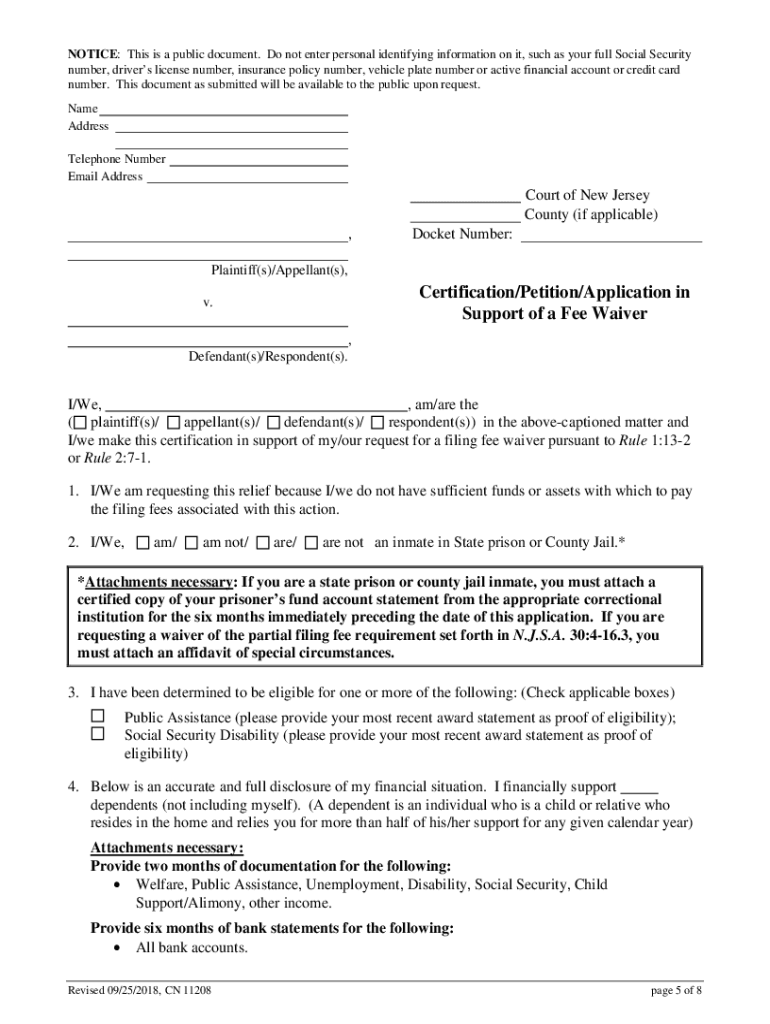
General Fee Waiver How to File a Fee Waiver Revised September 2018How to File for a Fee Waiver All Courts Who Should Use This Packet? You should use this packet if you believe that you cannot afford.
Loading

Open form follow the instructions

Easily sign the form with your finger

Send filled & signed form or save
How to fill out the NJ CN 11208 online
The NJ CN 11208 form is essential for individuals seeking to waive filing fees based on financial need when involved in court cases across various New Jersey courts. This guide provides a clear and supportive framework for completing the form online, ensuring you have all necessary information and understanding.
Follow the steps to fill out the NJ CN 11208 online effectively.
- Press the ‘Get Form’ button to access the NJ CN 11208 form and open it in the editor.
- Begin by completing Form A, the Certification/Petition/Application in Support of a Fee Waiver. This section requires you to disclose your reasons for requesting the fee waiver, alongside your financial and employment details. Ensure all information is current and accurately reflects your situation.
- Fill out Form B, the Order Waiving Filing Fees. Enter your personal information at the top and identify yourself as either a plaintiff or defendant as appropriate. Leave the date and other sections for court completion.
- Review your completed forms meticulously. Check for completeness and accuracy, removing any instruction sheets, and sign where required.
- Submit Form A, Form B, and all supporting documentation to the appropriate court. Be sure to redact any confidential personal information before submission.
- After submission, keep a copy of all documents for your records. You may now save, download, or print your filled forms for future reference.
Take the next step and complete your documents online today.
Experience a faster way to fill out and sign forms on the web. Access the most extensive library of templates available.
Related content
Results 51 - 60 of 415 - Revised: 03/26/2018, CN 11208 page 1 of 8 General- Fee...
Apr 21, 2018 - April 21, 2018 ... parole (as in Colorado and Connecticut), or when they...
Get answers to your most pressing questions about US Legal Forms API.
Can court fees be waived?
If you do not have a lawyer, you can still call the local legal aid office to see if they can help you get any court fees waived or you can ask the judge to waive some or all of the court fees by filling out a form called a fee waiver request. ... you do not have enough income to support your family and pay the court fees.
Can you get more than one SAT fee waiver?
One fee waiver can only be applied only to one registration. If you miss your test, you can't use the same fee waiver again. ... Again, you can get a maximum of two fee waivers, so you can waive the fee to take the SAT twice. If you need to change your test date, you will have to pay the fee of $28.
Does UC accept College Board fee waivers?
UC will waive application fees for up to four campuses for quali ed students who would otherwise be unable to apply for admission. The fee waiver program is for United States citizens, permanent residents, and applicants eligible for AB540 bene ts.
How do you get a common app fee waiver?
You can request fee waivers from any of your Common App schools! To obtain a Common App fee waiver, you have to meet the same requirements as those described above. In your Profile section, you'll indicate whether or not you qualify for a fee waiver, and then you'll select your reason why.
How do I get my CUNY issued fee waiver?
In order to receive your Veterans Fee Waiver, follow 3 easy steps: Create your CUNY Portal Account by visiting: cuny.edu/apply. Fill out the online application and, when complete, select the "PAY LATER" option.
How do I get my College Board fee waivers?
Sign in at collegeboard.org/mysat. Click the link Get your college application fee waivers* View fee-waiver options. Clicking the link takes students to a page where they can: Print their college application fee waivers. ... Send fee waiver.
Can I get another SAT fee waiver?
One fee waiver can only be applied only to one registration. If you miss your test, you can't use the same fee waiver again. ... Again, you can get a maximum of two fee waivers, so you can waive the fee to take the SAT twice. If you need to change your test date, you will have to pay the fee of $28.
What does the SAT fee waiver cover?
Fee waivers cover more than just the testing fees. When you register for the SAT or SAT Subject Tests, the fee waiver will cover: The registration fee for the SAT or SAT Subject Tests (the fee covers the costs of up to three individual SAT Subject Tests taken on a single test day).
What is a fee waiver?
National Association for College Admission Counseling (NACAC) fee waiver. The NACAC allows students to apply to up to four colleges without having to pay the application fee. A student will be eligible for a NACAC college application fee waiver if they meet the requirements for an SAT or ACT testing fee waiver.
What does a fee waiver cover?
Your fee waiver covers the cost of two SAT registrations. ... Students who use an SAT fee waiver also get free unlimited score sends, waived application fees at select colleges, and unlimited CSS Profile application fee waivers (starting fall 2018) to apply for financial aid.
Use professional pre-built templates to fill in and sign documents online faster. Get access to thousands of forms.
If you believe that this page should be taken down, please follow our DMCA take down process here.