Loading
Get Hi Form 5dc57 2018-2026
How it works
-

Open form follow the instructions
-

Easily sign the form with your finger
-

Send filled & signed form or save
How to fill out the HI Form 5DC57 online
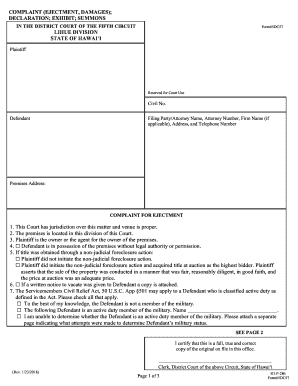
Filling out the HI Form 5DC57 online can be a straightforward process with the right guidance. This form is specifically used for complaints related to ejectment and damages in the District Court of the Fifth Circuit in Hawai‘i.
Follow the steps to accurately complete the form online.
- Press the 'Get Form' button to retrieve the HI Form 5DC57 and open it in your online editor.
- Begin by filling in the plaintiff section, including your name, address, and contact information. Ensure all details are accurate to avoid delays.
- Provide the premises address where the ejectment action is taking place. Double-check for accuracy to ensure proper jurisdiction.
- Indicate whether the defendant is in possession of the premises without legal authority by selecting the appropriate options.
- If the title was obtained through a non-judicial foreclosure action, specify whether you initiated the action and provide any necessary details.
- If a written notice to vacate was provided to the defendant, attach a copy to the form.
- Review the section regarding the Servicemembers Civil Relief Act, checking all relevant statements about the defendant's military status.
- Specify what relief you are seeking, including possession of the premises, a writ of possession, and any monetary judgment sought.
- Sign the form in the designated area, ensuring to also date it. If applicable, include the printed name below your signature.
- After completing the form, you can save your changes, download, print, or share the completed form as needed.
Complete your documents online easily and efficiently today.
To request a form by mail or fax, you may call our Taxpayer Services Form Request Line at 808-587-4242 or toll-free 1-800-222-3229.