Loading
Get Ak Civ-501 2020-2026
How it works
-

Open form follow the instructions
-

Easily sign the form with your finger
-

Send filled & signed form or save
How to fill out the AK CIV-501 online
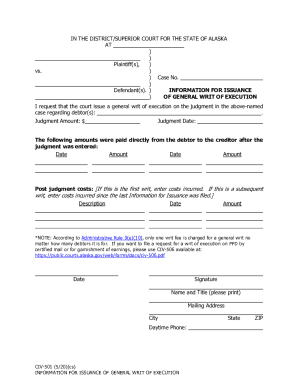
This guide provides clear and concise instructions for completing the AK CIV-501 form online. The form is essential for requesting the court to issue a general writ of execution based on a judgment.
Follow the steps to complete the AK CIV-501 online effectively.
- Click ‘Get Form’ button to obtain the form. This action allows you to access the AK CIV-501 document for completion.
- In the designated area, enter the case number that corresponds with the legal matter pertaining to the writ of execution. Ensure all numbers are accurate to avoid processing delays.
- Identify the debtor(s) related to the case and provide their full names in the specified section. This includes any relevant information necessary for a successful execution request.
- Detail the judgment amount in the appropriate field. It's crucial to ensure this number matches the judgment entered by the court.
- List any payments made directly from the debtor to the creditor after the judgment date. Provide dates and amounts in the supplied fields to ensure accuracy in the record.
- If this is the first writ, enter any post-judgment costs incurred; if this is a subsequent writ, enter costs incurred since the last issuance request.
- Complete the signature section with your name and title. Then, provide your mailing address, city, state, and ZIP code. Make sure all information is correct for proper processing.
- Finally, include your daytime phone number. This information may be necessary for any follow-up communication.
- Once all sections are completed, you can save changes, download a copy for your records, print the form, or share it as needed.
Complete your AK CIV-501 form online today for a smooth filing experience.