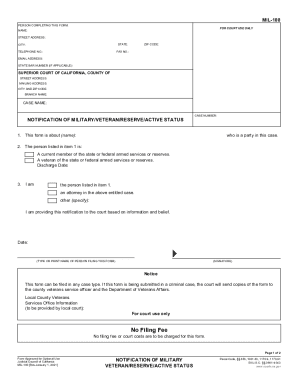
MIL-100 ATTORNEY OR PARTY WITHOUT ATTORNEY STATE BAR NO FOR COURT USE ONLY NAME FIRM NAME STREET ADDRESS CITY STATE TELEPHONE NO. ZIP CODE FAX NO. E-MAIL ADDRESS ATTORNEY FOR Name SUPERIOR COURT OF CALIFORNIA COUNTY OF CITY AND ZIP CODE BRANCH NAME CASE NAME CASE NUMBER NOTIFICATION OF MILITARY STATUS Consult your attorney before submitting this form* You may decline to submit this form to the court without penalty. declare as follows I name I am a party in a superior court case. I am currently a member of the state or federal armed services or reserves. My entry date is and I a* am on active duty service. b. have been called or ordered into active duty service. am not on active duty service. c* d. other please explain I used to serve in the state or federal armed services or reserves. I was discharged on date I understand that if I submit this form to the court as a defendant in a criminal case the court will send copies of the form to the county veterans service officer and the Depar....

How it works
  • Open form

    Open form follow the instructions

  • Easily sign form

    Easily sign the form with your finger

  • Share form

    Send filled & signed form or save

How to fill out the CA MIL-100 online

The CA MIL-100 form is essential for notifying the court of a person's military status, ensuring that eligible rights and protections are considered. This guide will walk you through the process of filling out the form online, providing clear instructions for each section.

Follow the steps to successfully complete the CA MIL-100 form.

  1. Press the ‘Get Form’ button to retrieve the form and open it for editing.
  2. Locate the ‘FOR COURT USE ONLY’ section and fill in the case number.
  3. In the ‘PERSON COMPLETING THIS FORM’ section, provide your name, street address, city, state, and zip code.
  4. Include your telephone number, fax number, and email address in the respective fields. If applicable, add your state bar number.
  5. For the ‘SUPERIOR COURT OF CALIFORNIA, COUNTY OF’ section, fill in the court's street address, mailing address, city, and zip code.
  6. In the ‘NOTIFICATION OF MILITARY/VETERAN/RESERVE/ACTIVE STATUS’ section, state the name of the individual relevant to this notification.
  7. Specify the military status of the individual by checking the appropriate boxes: current member, veteran, and include the discharge date if applicable.
  8. Identify your role in the case in item 3 by checking the corresponding box (yourself, attorney, or other).
  9. Sign and date the form, and provide your printed name in the designated area.
  10. After completing the form, review all entries for accuracy. You can save your changes, download, print, or share the form as needed.

Complete your CA MIL-100 form online today to ensure your military status is recognized in court.

Get form

Experience a faster way to fill out and sign forms on the web. Access the most extensive library of templates available.

Related content

Browse All Forms by Number - California Courts

Browsing Form Files on California Courts. The Judicial .... 9/1/2015, Order on Court Fee...

Learn more
(PDF) Liquid-assisted mechanochemical synthesis of...

Microporous and Mesoporous Materials 213 (2015) 14e21 Contents lists ... a large number of...

Learn more
Digi Mil S3160 Users Manual Congratulations On...

MIL-S3160 to the manual 10ef8e87-6c58-4cb5-810f-99a54d495e1d. 2015-02-04 ... to network...

Learn more
Get This Form Now!

Use professional pre-built templates to fill in and sign documents online faster. Get access to thousands of forms.

If you believe that this page should be taken down, please follow our DMCA take down process here.

Get CA MIL-100