Loading
Form preview
  • US Legal Forms
  • Other Templates
  • Legal Forms
  • Wisconsin Legal Forms
  • Wi Dj-le-272b 2006

Get Wi Dj-le-272b 2006-2026

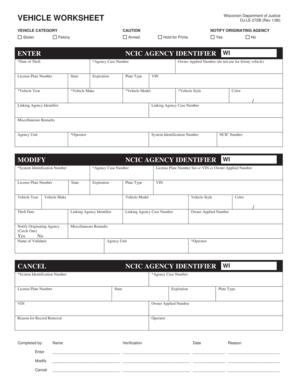
Y ORIGINATING AGENCY Armed Hold for Prints Yes No NCIC AGENCY IDENTIFIER WI ENTER *Date of Theft *Agency Case Number License Plate Number State Expiration *Vehicle Year *Vehicle Make Plate Type Owner Applied Number (do not use for felony vehicle) VIN *Vehicle Model Linking Agency Identifier *Vehicle Style Color / Linking Agency Case Number Miscellaneous Remarks Agency Unit *Operator System Identification Number NCIC AGENCY IDENTIFIER WI MODIFY *System Identification Nu.

How it works

  1. Open form

    Open form follow the instructions

  2. Easily sign form

    Easily sign the form with your finger

  3. Share form

    Send filled & signed form or save

How to fill out the WI DJ-LE-272B online

Filling out the WI DJ-LE-272B form is an essential step in reporting vehicle theft or related issues effectively. This guide will provide you with a clear and detailed walkthrough to complete the form online with confidence.

Follow the steps to complete the vehicle worksheet.

  1. Click ‘Get Form’ button to access the form and open it for editing.
  2. In the vehicle category section, indicate the theft status of the vehicle by marking 'Stolen'. Make sure to highlight the level of caution applicable, such as 'Felony'.
  3. Notify the originating agency by checking the appropriate box. If there are specific instructions or holds (e.g., 'Hold for Prints'), select 'Yes' or 'No' as required.
  4. Enter the NCIC agency identifier in the designated field to ensure proper tracking of the report.
  5. Fill in the *Date of Theft, *Agency Case Number, *Vehicle Year, *Vehicle Make, *Vehicle Model, *Vehicle Style, and VIN. All fields marked with an asterisk (*) are mandatory.
  6. If applicable, provide the license plate number, state, expiration date, color, and any miscellaneous remarks that might help in the investigation.
  7. For modifying an existing report, fill in the *System Identification Number, and update any details such as the vehicle status, case number, or any other relevant information.
  8. If you are canceling a record, ensure to specify the reason for record removal and include all necessary identification numbers.
  9. Review all entered information carefully to ensure accuracy. Once verified, you can save changes, download, print, or share the completed form as needed.

Complete your vehicle worksheet online now to ensure timely reporting and processing.

Get form

Experience a faster way to fill out and sign forms on the web. Access the most extensive library of templates available.
Get form

Related content

Vehicle worksheet - WILENET
DJ-LE-272B (Rev 1/06). Completed by: Name. Verification. Date. Reason. Enter ... WI.
Learn more
CE-QUAL-W2: A Two-Dimensional, Laterally Averaged...
... D.J. 1968. "The Bacteriological Aspects of Stormwater Pollution", J. of the Water...
Learn more
MAlNOEC-ll-DZTCA-A-C DATE
S. ONE SINGLE ITERATION PHSS (~R11=1) TAKES ABOUT!3 SECONDS. ******NOTEI*****. THE SINGLE...
Learn more

Related links form

SF 95 2007 SSA-821-BK 2012 AU Statutory Declaration - Victoria 2014 NYC DoE Extended Use App 2012

Get This Form Now!

Use professional pre-built templates to fill in and sign documents online faster. Get access to thousands of forms.
Get form
If you believe that this page should be taken down, please follow our DMCA take down processhere.
Get WI DJ-LE-272B
Get form
  • Adoption
  • Bankruptcy
  • Contractors
  • Divorce
  • Home Sales
  • Employment
  • Identity Theft
  • Incorporation
  • Landlord Tenant
  • Living Trust
  • Name Change
  • Personal Planning
  • Small Business
  • Wills & Estates
  • Packages A-Z
  • Affidavits
  • Bankruptcy
  • Bill of Sale
  • Corporate - LLC
  • Divorce
  • Employment
  • Identity Theft
  • Internet Technology
  • Landlord Tenant
  • Living Wills
  • Name Change
  • Power of Attorney
  • Real Estate
  • Small Estates
  • Wills
  • All Forms
  • Forms A-Z
  • Other Templates
  • Legal Hub
  • About Us
  • Help Portal
  • Legal Resources
  • Blog
  • Affiliates
  • Contact Us
  • Delete My Account
  • Site Map
  • Industries
  • Forms in Spanish
  • Localized Forms
  • State-specific Forms
  • Forms Kit
  • Real Estate Handbook
  • All Guides
  • Notarize
  • Incorporation services
  • For Consumers
  • For Small Business
  • For Attorneys
  • USLegal
  • FormsPass
  • pdfFiller
  • signNow
  • altaFlow
  • DocHub
  • Instapage
Form Packages
  • Adoption
  • Bankruptcy
  • Contractors
  • Divorce
  • Home Sales
  • Employment
  • Identity Theft
  • Incorporation
  • Landlord Tenant
  • Living Trust
  • Name Change
  • Personal Planning
  • Small Business
  • Wills & Estates
  • Packages A-Z
Form Categories
  • Affidavits
  • Bankruptcy
  • Bill of Sale
  • Corporate - LLC
  • Divorce
  • Employment
  • Identity Theft
  • Internet Technology
  • Landlord Tenant
  • Living Wills
  • Name Change
  • Power of Attorney
  • Real Estate
  • Small Estates
  • Wills
  • All Forms
  • Forms A-Z
  • Other Templates
Customer Service
  • Legal Hub
  • About Us
  • Help Portal
  • Legal Resources
  • Blog
  • Affiliates
  • Contact Us
  • Delete My Account
  • Site Map
  • Industries
  • Forms in Spanish
  • Localized Forms
  • State-specific Forms
  • Forms Kit
Legal Guides
  • Real Estate Handbook
  • All Guides
Prepared for you
  • Notarize
  • Incorporation services
Our Customers
  • For Consumers
  • For Small Business
  • For Attorneys
Our Sites
  • USLegal
  • FormsPass
  • pdfFiller
  • signNow
  • altaFlow
  • DocHub
  • Instapage
Social Media
Call us now toll free:
+1 833 426 79 33
As seen in:
© Copyright 1999-2026 airSlate Legal Forms, Inc. 17 Station Street, Ste. 203, Brookline, MA 02445
  • Your Privacy Choices
  • Terms of Service
  • Privacy Notice
  • Content Takedown Policy
  • Bug Bounty Program