Loading
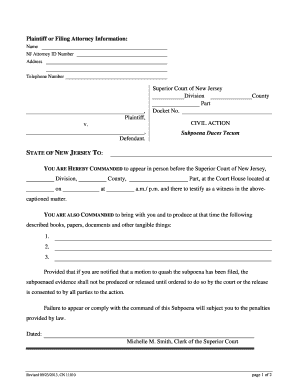
Get Nj Cn 11010 2013-2026
How it works
-

Open form follow the instructions
-

Easily sign the form with your finger
-

Send filled & signed form or save
How to fill out the NJ CN 11010 online
Filling out the NJ CN 11010 form online can be straightforward if you follow the right steps. This guide provides a clear overview of each component of the form to assist you in completing it accurately.
Follow the steps to successfully complete the NJ CN 11010 form online.
- Click the ‘Get Form’ button to obtain the form and open it in the editor.
- Begin by entering the plaintiff or filing attorney's information in the designated fields. This includes their name, NJ Attorney ID Number, address, and telephone number.
- Next, fill in the section labeled 'SUPERIOR COURT OF NEW JERSEY'. You need to specify the Division, Part, and Docket Number related to the case.
- Specify the County where the civil action is taking place.
- In the proceeding text, replace 'Defendant' with the name of the party you are issuing the subpoena to.
- Indicate the date and time when the subpoena is to be answered, along with the specific location where the witness is required to appear.
- List out the specific documents or items that you are commanding the individual to bring and produce. Include a clear description for each item.
- Complete the section regarding the proof of service. Enter your name and details of how the subpoena was served to ensure compliance with legal standards.
- Finally, sign and date the form to validate it. Ensure that all entries are accurate and complete.
- After finishing the completion of the form, you can save changes, download, print, or share the form as needed.
Complete your documents online with ease and confidence.
Related links form
Filling out a lottery slip involves choosing your numbers or selecting the quick pick option. You should also ensure you enter the correct game and draw date. Take your time to double-check your entries to avoid mistakes before submitting your ticket for the NJ lottery.