Loading
Get Mn Court Form 417.02
How it works
-

Open form follow the instructions
-

Easily sign the form with your finger
-

Send filled & signed form or save
How to fill out the MN Court Form 417.02 online
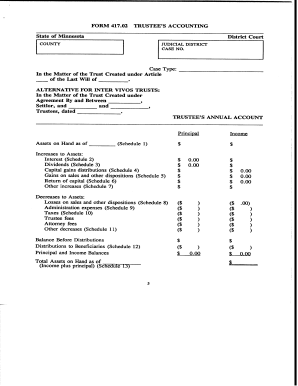
Filling out the MN Court Form 417.02, which is utilized for trustee accounting, can seem complex. This guide provides step-by-step instructions to help users seamlessly complete the form online, ensuring accuracy and compliance.
Follow the steps to successfully fill out the form.
- Press the ‘Get Form’ button to access the form and open it in your document editor.
- Begin with the top section by entering the case type and the name of the trust. You may need to include details such as the article of the Last Will or the agreement between the settlor and the trustees.
- Complete Schedule 1 by listing the principal assets on hand as of the relevant date, including cash equivalents and investments. Provide detailed descriptions including bank names and account numbers.
- Fill out Schedule 2 for interest income, entering the income amounts from each account. Specify the bank account names and account numbers.
- Proceed to Schedule 3 to document dividends received from stocks. List each security and the respective dividend amounts.
- For Schedule 4, note any capital gains distributions. Provide specifics on each security and the amounts received.
- Schedule 5 requires you to detail gains on sales and other dispositions. Document each sale, including proceeds received and the cost or basis.
- Continue with Schedule 6, entering any returns of capital received from securities.
- Fill out Schedule 7 for other increases in assets, providing the amounts and descriptions as necessary.
- Complete Schedule 8 to report any losses on sales, documenting each loss just as you did for gains.
- In Schedule 9, detail administrative expenses, listing all costs incurred in managing the trust.
- Schedule 10 is for any taxes; ensure you include all applicable tax amounts.
- Document other decreases in Schedule 11, noting any declines in value or expenses not previously covered.
- List distributions to beneficiaries in Schedule 12. Include the names, dates, and descriptions of what was distributed.
- For Schedule 13, summarize the total assets on hand as of the end date and provide evaluations for accuracy.
- If applicable, complete Schedule 14 with any assets that realized a net income of less than 1%.
- Finally, ensure all required signatures are collected. The document must be signed by the trustees and notarized.
- Once completed, save your changes, and download or print the form as needed for submission.
Begin filling out MN Court Form 417.02 online today to manage trustee accounting effectively.
Related links form
To ask for a motion in court, you typically need to prepare a written request outlining the specific relief you seek. Utilize the MN Court Form 417.02 to draft your request, ensuring all relevant details are included. When you're ready, submit this motion to the court and serve it on the opposing party. If necessary, be prepared to explain your request during a hearing.