Loading
Form preview
  • US Legal Forms
  • Other Templates
  • Legal Forms
  • Iowa Legal Forms
  • Ia Form 210 2013

Get Ia Form 210 2013-2026

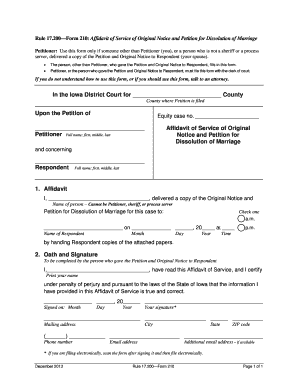
Etitioner (you), or a person who is not a sheriff or a process server, delivered a copy of the Petition and Original Notice to Respondent (your spouse). The person, other than Petitioner, who gave the Petition and Original Notice to Respondent, fills in this form. Petitioner, or the person who gave the Petition and Original Notice to Respondent, must file this form with the clerk of court. If you do not understand how to use this form, or if you should use this form, talk to an attor.

How it works

  1. Open form

    Open form follow the instructions

  2. Easily sign form

    Easily sign the form with your finger

  3. Share form

    Send filled & signed form or save

How to fill out the IA Form 210 online

The IA Form 210, also known as the Affidavit of Service of Original Notice and Petition for Dissolution of Marriage, is essential when a person other than the Petitioner delivers the petition and notice to the Respondent. This guide provides clear and comprehensive instructions for completing this form online.

Follow the steps to successfully complete the IA Form 210.

  1. Click the ‘Get Form’ button to access the form and open it in your editor. This action allows you to begin filling out the necessary fields with ease.
  2. In the first section, provide the name of the person who delivered the Petition and Original Notice to the Respondent. Ensure that this individual is neither the Petitioner nor a sheriff or process server.
  3. Next, indicate the county where the Petition is filed by selecting from the relevant options or typing in the name of the county.
  4. Fill in the full name of the Respondent, including first, middle, and last names. This should accurately reflect their legal name as recognized.
  5. Complete the affidavit section by recording the date and time the service was performed. Make sure to check the appropriate box for either a.m. or p.m. to indicate when the delivery occurred.
  6. In the oath and signature section, the person who delivered the documents must print their name, sign, and provide the date of signature. This section is crucial as it serves as a certification of the information provided.
  7. Finally, fill in the mailing address, phone number, and email address of the person who delivered the documents. If available, include an additional email address for further communication.
  8. Once all fields are completed, save the changes to the form. You also have the option to download, print, or share the filled-out form as necessary.

Complete your IA Form 210 online today to ensure a smooth process in your dissolution of marriage.

Get form

Experience a faster way to fill out and sign forms on the web. Access the most extensive library of templates available.
Get form

Related content

Affidavit of Service of Original Notice and...
This form is used when someone other than the petitioner, sheriff, or process server...
Learn more
Form IS-210, Request to Change Status to J-1
Application fee of $300.00 (This should be a check payable to the “Department of...
Learn more
Final Rule: Reporting by Investment Advisers to...
Jul 1, 2011 — SEC requires advisors with $150M+ assets to file Form PF. CFTC requires...
Learn more

Related links form

IL DoR IL-1040 2017 IL DoR IL-1040 2016 IL DoR IL-1040 2014 IL DoR IL-1040 2013

Questions & Answers

Get answers to your most pressing questions about US Legal Forms API.

Contact support

Filling out Form 4056t requires you to provide specific information regarding your tax situation, including identifying details and the type of relief you need. You should read the instructions carefully to ensure all sections are completed accurately. For personalized assistance, consider using US Legal Forms to help you navigate this form properly.

To fill out Form 7202, begin with providing your basic information, including your name and social security number. Next, carefully follow the sections related to the hours you missed work due to qualifying reasons. Reviewing IRS instructions or consulting US Legal Forms can help ensure accuracy in your submission and maximize your benefits.

Filling out the 7202 tax credit involves entering accurate figures regarding your sick and family leave. Start by detailing the total hours you were unable to work due to specified reasons. Ensure you consult IRS guidelines or use reliable platforms like US Legal Forms for precise instructions. A correct completion ensures that you receive your deserving tax credits.

In Spain, the 210 form is used to declare income derived from property located in the country. It is primarily used by non-residents for tax purposes related to real estate. Understanding how this form functions can be essential for anyone with property interests in Spain. US Legal Forms provides resources that can help you navigate international forms effectively.

To fill out a withholding allowance certificate, start by gathering your personal information, such as your filing status and the number of allowances you want to claim. Next, accurately complete each section of the form to reflect your situation. This information will help your employer calculate the appropriate amount to withhold from your paychecks. Platforms like US Legal Forms offer templates and guidance to make this easier.

Yes, you typically need to provide proof when you file IRS Form 7202. You must document the number of hours you took off work due to qualifying reasons, which can include caring for a family member or your own health issues. Proper documentation ensures compliance and can help fortify your claim. Consider using US Legal Forms to guide you through the necessary documentation.

On IRS Form 7202, the amount you can claim varies based on your circumstances. This form is used to calculate sick leave and family leave credits from your 2021 tax filings. To maximize your claim, ensure you gather all relevant documentation that supports your eligibility. US Legal Forms can assist you in understanding the exact calculations needed.

Yes, you can electronically file IRS Form 7202. This option simplifies the submission process, allowing you to send your form quickly and efficiently. Many users prefer this method due to the immediate confirmation of receipt. Utilizing platforms like US Legal Forms can further streamline this process for you.

Filing form 2210 in TurboTax is simple and user-friendly. Start by navigating to the section for penalties related to underpayment, where the program will guide you through entering the necessary details for IA Form 210. With TurboTax's step-by-step prompts, you can complete your form accurately and confidently.

In TurboTax, you can enter your estimated tax payments in the section specifically designed for estimated taxes. While working on your return, the program will prompt you to provide this information, which is crucial for accurately filling out IA Form 210. This seamless process helps you stay organized and ensures all relevant data is captured for your tax filing.

Get This Form Now!

Use professional pre-built templates to fill in and sign documents online faster. Get access to thousands of forms.
Get form
If you believe that this page should be taken down, please follow our DMCA take down processhere.
Get IA Form 210
Get form
  • Adoption
  • Bankruptcy
  • Contractors
  • Divorce
  • Home Sales
  • Employment
  • Identity Theft
  • Incorporation
  • Landlord Tenant
  • Living Trust
  • Name Change
  • Personal Planning
  • Small Business
  • Wills & Estates
  • Packages A-Z
  • Affidavits
  • Bankruptcy
  • Bill of Sale
  • Corporate - LLC
  • Divorce
  • Employment
  • Identity Theft
  • Internet Technology
  • Landlord Tenant
  • Living Wills
  • Name Change
  • Power of Attorney
  • Real Estate
  • Small Estates
  • Wills
  • All Forms
  • Forms A-Z
  • Other Templates
  • Legal Hub
  • About Us
  • Help Portal
  • Legal Resources
  • Blog
  • Affiliates
  • Contact Us
  • Delete My Account
  • Site Map
  • Industries
  • Forms in Spanish
  • Localized Forms
  • State-specific Forms
  • Forms Kit
  • Real Estate Handbook
  • All Guides
  • Notarize
  • Incorporation services
  • For Consumers
  • For Small Business
  • For Attorneys
  • USLegal
  • FormsPass
  • pdfFiller
  • signNow
  • altaFlow
  • DocHub
  • Instapage
Form Packages
  • Adoption
  • Bankruptcy
  • Contractors
  • Divorce
  • Home Sales
  • Employment
  • Identity Theft
  • Incorporation
  • Landlord Tenant
  • Living Trust
  • Name Change
  • Personal Planning
  • Small Business
  • Wills & Estates
  • Packages A-Z
Form Categories
  • Affidavits
  • Bankruptcy
  • Bill of Sale
  • Corporate - LLC
  • Divorce
  • Employment
  • Identity Theft
  • Internet Technology
  • Landlord Tenant
  • Living Wills
  • Name Change
  • Power of Attorney
  • Real Estate
  • Small Estates
  • Wills
  • All Forms
  • Forms A-Z
  • Other Templates
Customer Service
  • Legal Hub
  • About Us
  • Help Portal
  • Legal Resources
  • Blog
  • Affiliates
  • Contact Us
  • Delete My Account
  • Site Map
  • Industries
  • Forms in Spanish
  • Localized Forms
  • State-specific Forms
  • Forms Kit
Legal Guides
  • Real Estate Handbook
  • All Guides
Prepared for you
  • Notarize
  • Incorporation services
Our Customers
  • For Consumers
  • For Small Business
  • For Attorneys
Our Sites
  • USLegal
  • FormsPass
  • pdfFiller
  • signNow
  • altaFlow
  • DocHub
  • Instapage
Social Media
Call us now toll free:
+1 833 426 79 33
As seen in:
© Copyright 1999-2026 airSlate Legal Forms, Inc. 17 Station Street, Ste. 203, Brookline, MA 02445
  • Your Privacy Choices
  • Terms of Service
  • Privacy Notice
  • Content Takedown Policy
  • Bug Bounty Program